
Instructions
Windows 11 Home vs Pro for Business Users
Apr
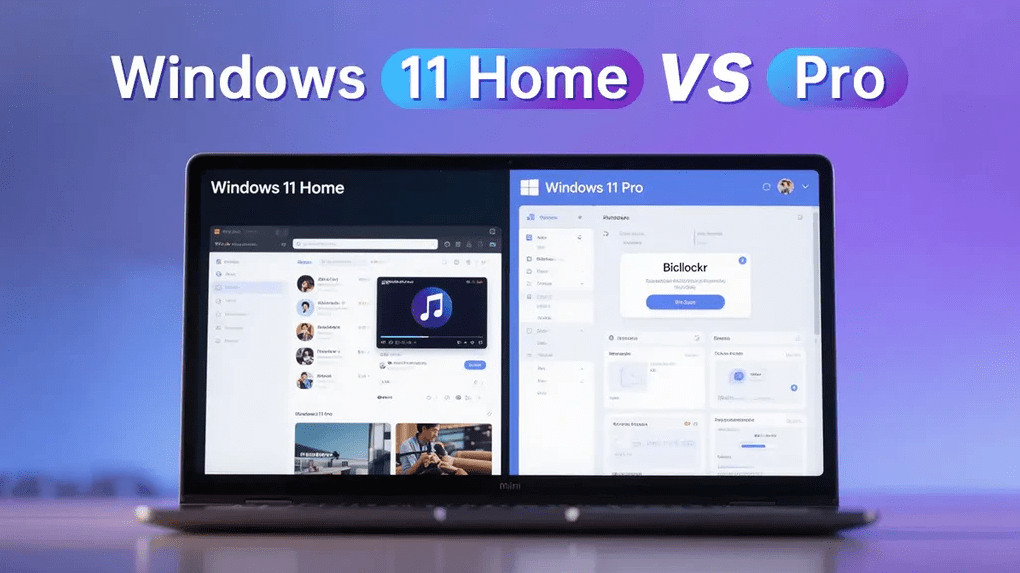
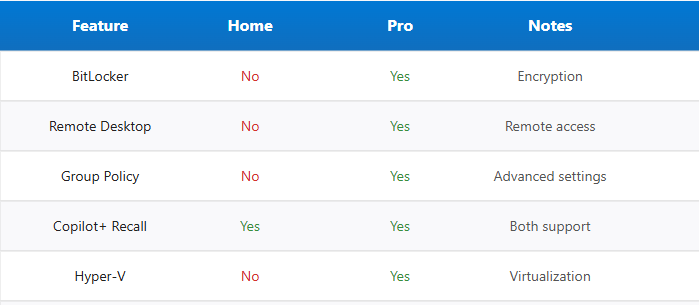
Choosing between Windows 11 Home vs Pro is easy for some people, but for business users, the choice matters more. Both editions share the same core Windows 11 experience, but Windows 11 Pro includes extra tools aimed at work, security, and device management. Microsoft’s official comparison page shows that both editions cover the basics, while Pro adds business-focused features such as BitLocker, Hyper-V, Remote Desktop, Group Policy, and domain or Microsoft Entra ID support.
What Is the Difference Between Windows 11 Home and Pro?
Windows 11 Home and Pro look very similar on the surface. You get the same interface, the same core desktop experience, and the same general productivity environment. The real difference appears in the advanced features. Microsoft’s compare page highlights that Pro adds tools intended for professional environments, especially in security, device management, and remote work.
What both editions include
Both Windows 11 Home and Pro include:
- the core Windows 11 interface
- standard productivity and multitasking features
- Microsoft Store access
- basic security protections
- support for modern hardware requirements
For many casual users, those features are enough. For business users, though, the missing Pro features can become important very quickly.
What Windows 11 Pro adds
Windows 11 Pro adds several features that matter in business environments:
- BitLocker drive encryption
- Hyper-V virtualization
- Remote Desktop host
- Group Policy management
- domain join and Microsoft Entra ID support
- business-oriented deployment and management options
These are the reasons many companies and self-employed professionals choose Pro instead of Home. Microsoft explicitly positions Windows 11 Pro for small and medium businesses and says it is designed to help organizations manage devices, protect data, and support business use cases.
Is Windows 11 Home Enough for Business Use?
Sometimes yes, but it depends on the kind of work you do.
When Windows 11 Home can be enough
Windows 11 Home may be enough if you:
- mainly use web apps and cloud tools
- work alone and do not manage multiple devices
- do not need full-disk encryption tools like BitLocker
- do not need to remote into your PC
- do not use virtualization for testing or business software
For freelancers with simple workflows, Home can still handle email, documents, spreadsheets, video calls, and browser-based work without any problem. This is an inference based on the feature set Microsoft includes in Home versus Pro.
Where Windows 11 Home starts to feel limited
Windows 11 Home becomes less practical when your work involves sensitive files, remote access, business IT policies, or advanced device control. Once you need even one or two Pro-only features, the difference becomes more important than the price gap. Microsoft’s business edition materials frame Pro as the business-ready option for stronger protection and management.
Why Windows 11 Pro Is Better for Business Users
This is the core of the comparison.
Security Features Matter More for Business
Security is one of the strongest reasons to choose Windows 11 Pro.
BitLocker drive encryption
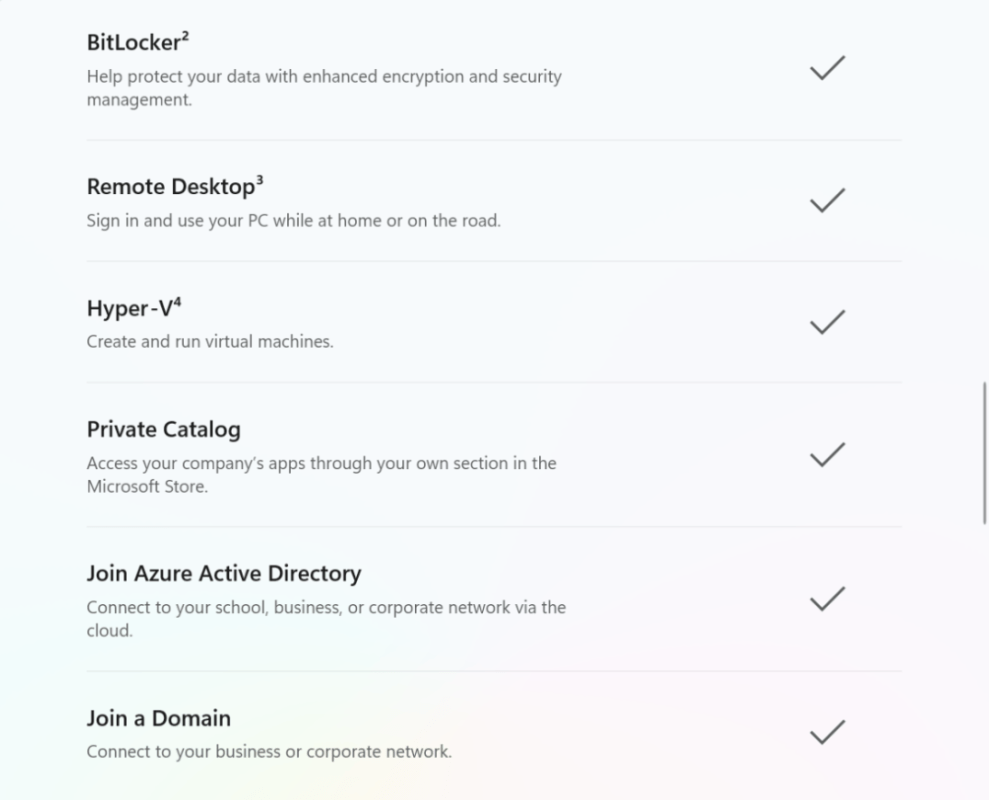
Microsoft’s comparison page and business materials show that BitLocker is available in Pro, not Home. BitLocker helps protect business files by encrypting the drive, which is especially valuable on laptops and work devices that leave the office.
Better protection for sensitive data
If you store invoices, contracts, customer details, or internal documents on your PC, stronger encryption matters. Windows 11 Pro is built for that kind of use. Microsoft’s licensing overview says Pro is designed to help organizations protect data and manage devices more effectively.
Remote Work Features Are Stronger in Pro
Remote and hybrid work make Pro more useful.
Remote Desktop host
Microsoft’s compare page shows that Windows 11 Pro includes Remote Desktop host capability, while Home does not. That means Pro lets you connect to your work PC remotely in ways that Home does not fully support.
Better for work-from-anywhere setups
For business users who travel, work from home, or need to access their office machine remotely, Pro is usually the safer choice. This is one of the clearest practical advantages in day-to-day work. That conclusion follows directly from Microsoft’s feature comparison.
Pro Includes Tools Useful for IT and Advanced Users
Some Pro features matter even if you are a solo business owner.
Hyper-V virtualization
Microsoft lists Hyper-V as a Pro feature. This is helpful if you test software, run isolated environments, or need virtual machines for development, training, or compatibility work.
Group Policy and domain join
Group Policy and domain join support are features that matter more in managed business environments. Microsoft’s comparison materials include these as Pro-level capabilities, which makes Pro more suitable for offices, teams, and growing businesses.
Better fit for growing businesses
A small business may start with one laptop and a basic workflow, but needs often grow. Once centralized management, stronger security, or device control become important, Pro is already built for that path. Microsoft’s business messaging around Windows 11 Pro supports this positioning.
Windows 11 Home vs Pro for Different Business Users
The best choice depends on the user.
Freelancers and solo professionals
If your work is light, cloud-based, and does not involve sensitive local files, Windows 11 Home can be enough. But if your laptop contains real client data or business documents, Pro becomes much easier to justify because of BitLocker and remote work features. That recommendation is an inference based on Microsoft’s official feature differences.
Small business owners
For small business owners, Windows 11 Pro is usually the better long-term choice. It gives you stronger built-in security, more flexibility, and room to grow without changing editions later. Microsoft explicitly says Windows 11 Pro is designed for small and medium businesses.
Teams with multiple devices
If multiple employees use Windows PCs, Pro is the more practical edition. Features like Group Policy, domain join, and business management support are much more relevant in this environment.
Is Windows 11 Pro Worth It for Business Users?
In most business cases, yes.
The main reason is not just “more features.” It is that the extra features are directly tied to business needs like encryption, remote access, virtualization, and management. If you will never use those things, Home may be fine. If even one of them matters to your workflow, Pro usually makes more sense. Microsoft’s business comparison and licensing pages support that distinction between consumer use and business use.
Quick Verdict
Here is the simplest way to look at it.
Choose Windows 11 Home if
- you only need basic productivity
- you work mostly in the browser
- you do not need BitLocker
- you do not need Remote Desktop host
- you do not need Hyper-V or domain tools
Choose Windows 11 Pro if
- you use your PC for business
- you want BitLocker encryption
- you need Remote Desktop host
- you want Hyper-V virtualization
- you expect your setup to grow
- you want more control over security and management
For most business users, Windows 11 Pro is the better fit. Microsoft’s own product and business pages consistently frame Pro as the edition built for business readiness, protection, and management.
FAQ
Is Windows 11 Home okay for work?
Yes, it can be okay for basic work such as email, documents, spreadsheets, and video meetings. But Windows 11 Pro is better for users who need stronger security, remote access, or device management. Microsoft’s compare pages show those business features in Pro rather than Home.
Why do business users choose Windows 11 Pro?
Business users often choose Pro because it includes BitLocker, Remote Desktop host, Hyper-V, Group Policy, and domain join support. Microsoft describes Pro as designed for small and medium businesses and for managing devices and protecting data.
Is BitLocker available in Windows 11 Home?
Microsoft’s official comparison pages show BitLocker as a Pro feature rather than a Home feature.
Can I upgrade from Windows 11 Home to Pro later?
Yes, Microsoft supports upgrading from Home to Pro, which makes it possible to start with Home and move to Pro when business needs increase. That upgrade path is reflected in Microsoft’s Windows business and comparison materials.
Which version is better for a small business?
For most small businesses, Windows 11 Pro is the better choice because it includes more security and management features. Microsoft specifically positions Pro for small and medium businesses.
If you need stronger security, remote access, and business-ready features, Windows 11 Pro is the better choice for most work setups.