
Instructions
Is Windows Recall Safe? Privacy, Settings, and What to Know
Jun
Windows Recall is one of the most talked-about Windows features in recent memory, and for a good reason. It promises to help users find things they have seen before on their PC much more easily. But for many people, the first reaction is not excitement. It is caution.
The real question is simple: Is Windows Recall safe?
The answer is that Recall can be safe if you understand how it works and configure it properly. It was built with privacy controls, but it is also a feature that naturally raises valid concerns because it deals with snapshots of what appears on your screen.
The Short Answer
If you want the quick version:
- Recall is designed with privacy controls
- it stores data locally on the device
- it includes encryption and sign-in protection
- it gives users control over filters, deletion, and storage
- but it is still a feature you should review carefully before using
So the best short answer is:
Yes, Windows Recall can be safe, but only if you are comfortable with how it works and you actively manage its settings.
What Windows Recall Actually Does
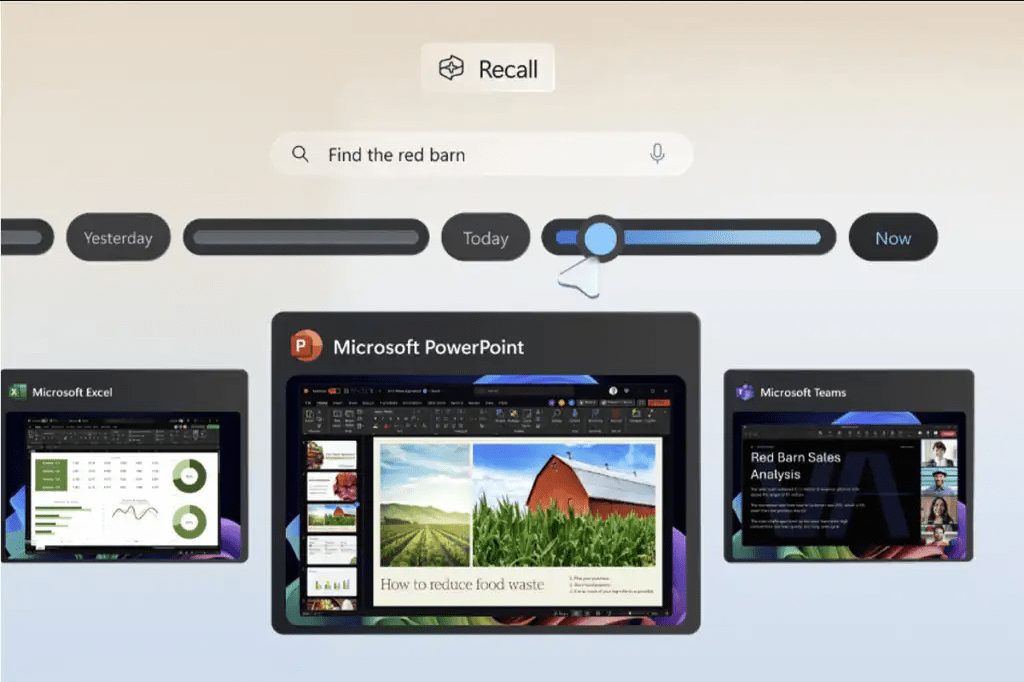
Recall is meant to help you find things you previously saw on your PC.
That includes things like:
- websites
- documents
- images
- apps
- content you viewed earlier
Instead of remembering exactly where something was, Recall is meant to help you search your previous activity more naturally.
That sounds useful, but it also explains why privacy is such a big part of the conversation.
Why People Worry About Recall
The concern is easy to understand.
If a feature saves snapshots of your activity, people immediately think about:
- private information
- passwords
- personal messages
- financial activity
- work data
- sensitive browsing content
That is exactly why Recall is not a feature you should judge only by the headline. The important part is how the data is stored, protected, filtered, and controlled.
Is Windows Recall Safe?
For most users, the honest answer is:
Recall can be safe enough for many people, but it is not something you should leave on without understanding the settings first.
Safety here depends on two things:
- how Microsoft designed it
- how the user chooses to manage it
If the privacy controls are strong and the user reviews the settings carefully, the risk becomes much easier to manage.
The Biggest Privacy Strengths of Recall
1. It is meant to work locally
One of the most important things about Recall is that it is designed around on-device use.
That matters because people are much more worried when they think data is constantly being pushed into the cloud.
A feature that works locally feels more controllable than one that depends heavily on external storage or remote processing.
2. It gives users direct control
Recall is not supposed to be an untouchable system that runs with no user choices.
Users can manage settings such as:
- turning snapshot saving on or off
- filtering certain apps
- filtering certain websites
- deleting snapshots
- managing storage use
That level of control is a big part of whether the feature feels acceptable.
3. It includes security protection
Another major reason Recall may be considered reasonably safe is that it is tied to local device security, not just convenience.
If a feature protects access through Windows sign-in security and local protections, that is much better than leaving sensitive history open to anyone who touches the PC.
What the Main Risks Are
Even with privacy protections, there are still risks people should take seriously.
1. Sensitive information may still matter
Even if the system has protections, the nature of the feature itself means it deals with visible on-screen content.
So the risk is not only “can outsiders get this data?”
It is also:
Do I want this type of history to exist at all on my device?
That is a very personal decision.
2. Not every user has the same comfort level
Some people will see Recall as a productivity tool. Others will see it as something they do not want anywhere near personal or professional activity.
That difference matters.
A privacy feature can be technically well-designed and still feel too intrusive for users who prefer minimal activity tracking.
3. Shared devices are a bigger concern
If a PC is shared with other people, even strong local protections may not fully remove the user’s discomfort.
Any feature that stores searchable history can feel more sensitive on:
- family PCs
- shared workstations
- school devices
- devices used by multiple people
Who Should Be More Careful with Recall
Some users should be more cautious than others.
You may want to be especially careful if you use your PC for:
- banking
- private health portals
- confidential work
- legal or financial documents
- sensitive messaging
- client information
- shared household use
In those cases, the smartest approach is not blind trust. It is careful setup.
Settings You Should Check First
If you are going to use Recall, do not just turn it on and forget it.
Review these things first:
Snapshot saving
Make sure you are comfortable with whether snapshots are being saved at all.
Filtered apps
Exclude apps you do not want included.
Filtered websites
Exclude websites that may contain personal or sensitive information.
Snapshot deletion
Know how to clear saved history if you no longer want it stored.
Storage settings
Check how much space Recall can use and how that history is managed over time.
These settings matter more than the marketing around the feature.
A Practical Privacy Approach
For most people, the best approach is not extreme. It is controlled use.
A practical setup would be:
- review the Recall settings before using it
- exclude sensitive apps and sites
- avoid using it casually on a shared device
- periodically clear old snapshots if you do not need them
- keep your PC protected with a strong sign-in method
That gives you a much more balanced use of the feature.
Should You Turn Recall On?
That depends on the kind of user you are.
Recall may be worth trying if:
- you often forget where you saw things
- you use your PC for research or multitasking
- you want faster history-style search across past activity
- you are comfortable reviewing privacy settings carefully
You may want to skip it if:
- you dislike any kind of activity snapshot feature
- you use your device for very sensitive work
- your PC is shared with others
- you prefer the smallest possible privacy footprint
Is Recall Safe Enough for Normal Users?
For many normal users, Recall may be safe enough if:
- the PC is personal, not shared
- the sign-in security is strong
- sensitive apps and websites are filtered
- the user understands what the feature is doing
That is the key point.
Recall is not really a feature that should be judged only as “safe” or “unsafe.”
It is more accurate to say that it is a high-trust feature that requires deliberate setup.
The Real Privacy Question
The real question is not just:
Can Microsoft make Recall secure?
The real question is:
Do you want your device keeping this kind of searchable visual history, even with protections?
For some users, the answer will be yes.
For others, the answer will clearly be no.
And that is okay.
Quick Verdict
Windows Recall can be safe for the right user with the right settings, but it is not the kind of feature you should leave on without thinking about it.
If you like the idea of quickly finding things you saw before and you are comfortable managing privacy filters, Recall may be useful. If you are very privacy-sensitive or use your PC for highly sensitive tasks, you may prefer to leave it off.
The safest approach is simple: understand it first, configure it carefully, and use it only if the trade-off makes sense for you.
FAQ
Is Windows Recall safe?
It can be safe if you understand how it works and manage the privacy settings carefully, but it is still a feature many users will want to review closely before enabling.
Does Recall save data locally?
Recall is designed around local device use, which is one of the main reasons Microsoft presents it as privacy-conscious.
Can you turn Recall off?
Yes, users can manage whether snapshot saving is enabled and can also control related settings.
Should privacy-conscious users use Recall?
Some will be comfortable with it after configuration, but others may prefer to leave it off entirely. It depends on your risk tolerance and how sensitive your device activity is.
Stay in control of your PC with genuine Windows licenses, instant delivery, and simple activation that keeps your setup secure and ready for what’s next.