
Instructions
Do You Need Windows 11 Pro for Remote Desktop?
Apr
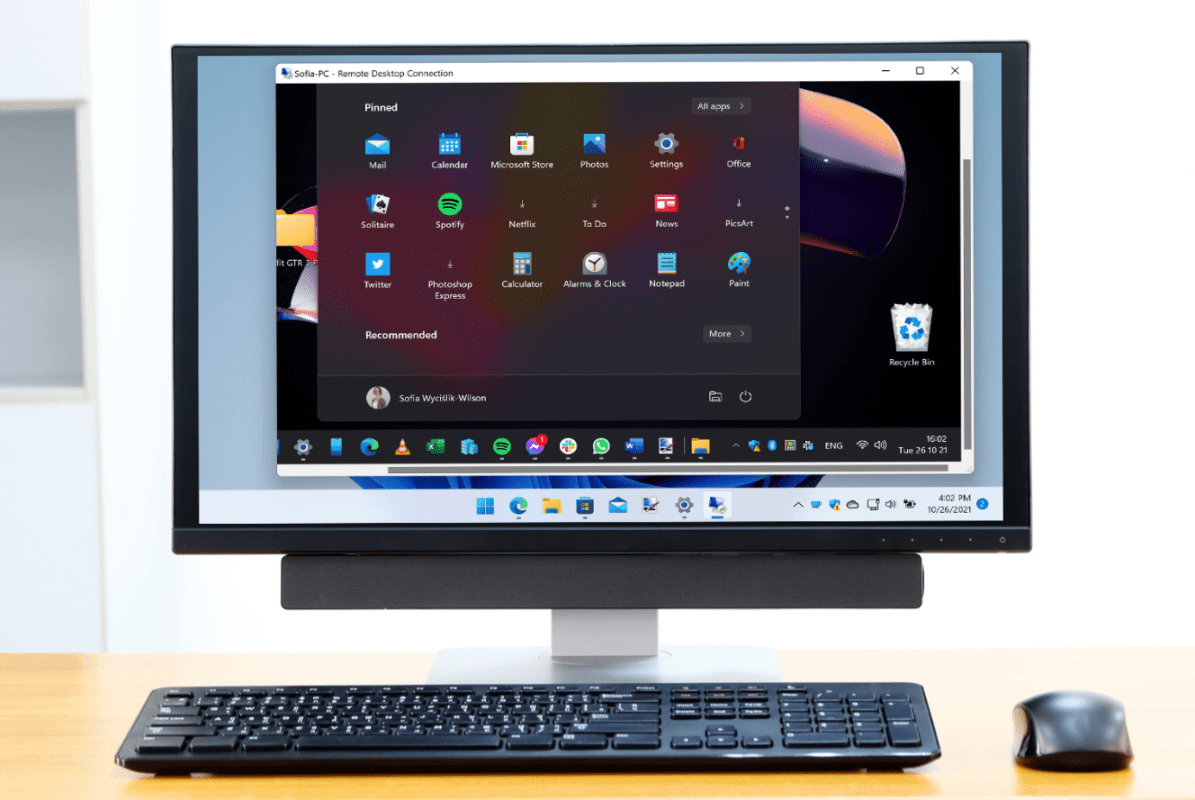
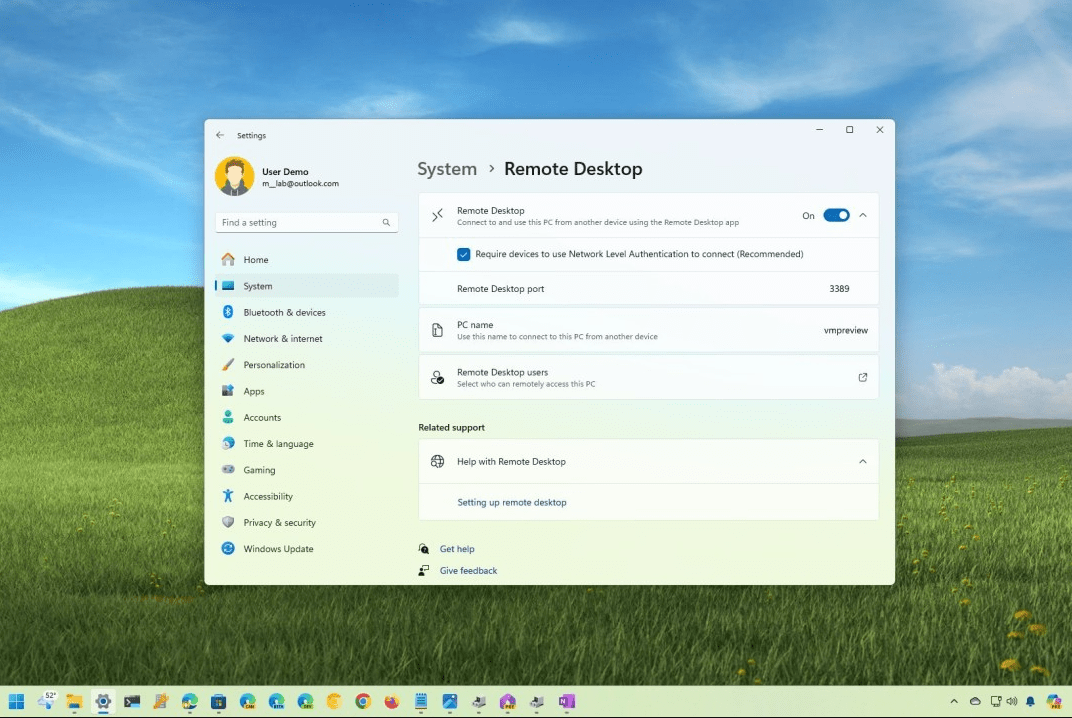
If you want to control your PC from another device, Windows 11 Pro is usually the version you need on the PC being connected to, because Microsoft says the remote PC must show Windows Pro under its edition before you enable Remote Desktop. In Microsoft’s own setup guide, the first check is to confirm the remote PC is running Windows Pro, and then turn on Settings > System > Remote Desktop.
That is where many users get confused. Windows 11 Home can still use the Remote Desktop Connection app to connect out to another PC, but it does not support acting as the full Remote Desktop host in the same way Pro does, as reflected in Microsoft’s guidance and Microsoft community answers.
The Short Answer
Yes, you need Windows 11 Pro or a higher edition on the host PC if you want to use Microsoft’s built-in Remote Desktop feature to let other devices connect to that PC. Microsoft’s official how-to guide says to verify that the remote PC shows Windows Pro before enabling Remote Desktop.
If you only want to connect from your PC to another remote PC, Windows 11 Home can still work as the client. The important difference is host vs client.
Host vs Client: What Actually Matters?
This is the easiest way to understand it.
Windows 11 Pro as the host
If your computer is the one that others will connect into, then Pro is the edition you want. Microsoft’s Remote Desktop setup instructions are written around enabling the feature on a Pro device through Windows settings.
Windows 11 Home as the client
If your computer is only being used to connect out to another PC, Home is usually enough. Microsoft’s community guidance specifically notes that Home can have the Remote Desktop Connection app while still not being usable as the host for incoming connections.
Why Remote Desktop Is a Pro Feature
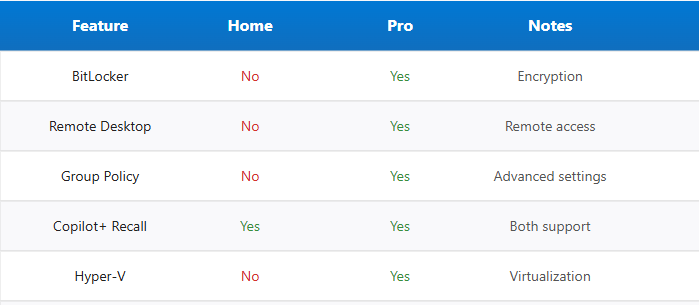
Microsoft positions Remote Desktop alongside other business and advanced features in Windows 11 Pro, such as BitLocker, Hyper-V, Group Policy, and domain-related tools, as shown in its business comparison materials.
That is why Remote Desktop is often one of the main reasons people upgrade from Home to Pro, especially if they:
- work from home and need office PC access
- manage another PC remotely
- need remote access for business tasks
- want a built-in Microsoft solution instead of third-party tools
Those use cases follow directly from what Remote Desktop is designed to do and how Microsoft groups it with Pro-focused features.
When Windows 11 Home Is Enough
Windows 11 Home is enough if:
- you only need to connect from your PC to another PC
- you do not need your own PC to accept incoming Remote Desktop sessions
- you are using other remote-access software instead of Microsoft’s built-in host feature
Microsoft’s official Remote Desktop page focuses on Pro for enabling the host side, while Microsoft community guidance makes the client-vs-host distinction clearer for Home users.
When You Should Upgrade to Windows 11 Pro
Upgrading to Pro makes sense if your PC needs to be the one people connect into. It also makes sense if you want other advanced features that are commonly bundled with Pro, including BitLocker and Hyper-V, which Microsoft lists as Pro-level capabilities.
For business users, remote workers, and anyone who wants built-in remote access without workarounds, Windows 11 Pro is usually the better fit. Microsoft’s business comparison page presents Pro as the edition aimed at business readiness and advanced management features.
Is Remote Desktop the Same as the Remote Desktop App?
Not exactly.
Microsoft announced that the Remote Desktop app for Windows from the Microsoft Store would no longer be supported starting May 27, 2025, for services like Windows 365, Azure Virtual Desktop, and Microsoft Dev Box, with users directed toward Windows App instead. That change does not mean the built-in Windows Remote Desktop host feature in Pro disappeared; it is a separate app transition.
This matters because some users see “Remote Desktop app” news and assume Windows 11 Pro no longer supports Remote Desktop at all, which is not what Microsoft’s setup documentation says.
Common Mistakes to Avoid
Thinking Home can host Remote Desktop
Microsoft’s own setup page tells users to verify the remote PC is running Pro before turning the feature on.
Confusing outgoing connections with hosting
A PC can have the Remote Desktop Connection app and still not be able to accept incoming sessions, as Microsoft community guidance explains for Home.
Forgetting network and password basics
Microsoft recommends enabling Remote Desktop only on trusted networks and making sure accounts with remote access use strong, unique passwords.
FAQ
Do I need Windows 11 Pro for Remote Desktop?
Yes, if your PC needs to receive incoming Remote Desktop connections using Microsoft’s built-in feature, because Microsoft says the remote PC should show Windows Pro before you enable Remote Desktop.
Can Windows 11 Home use Remote Desktop?
Windows 11 Home can generally be used as the client to connect to another PC, but Microsoft guidance and community answers indicate it does not support acting as the full built-in Remote Desktop host.
Why is Remote Desktop listed under Pro features?
Microsoft groups Remote Desktop with other advanced and business-oriented features in Windows 11 Pro, including BitLocker and Hyper-V, on its comparison materials.
Has Microsoft removed Remote Desktop from Windows 11?
No. Microsoft ended support for the Microsoft Store Remote Desktop app on May 27, 2025, for certain cloud and virtual desktop scenarios, but Microsoft still documents built-in Remote Desktop setup on Windows Pro PCs.
If your PC needs to accept Remote Desktop connections, upgrading to Windows 11 Pro is the simplest and most reliable option.