
Instructions
Windows 10 Support Has Ended: What You Need to Do Now
Jun
Windows 10 support has ended, and that changes a lot for anyone still using it every day. If your PC still runs Windows 10, it may seem fine at first, but the big difference now is that it no longer receives the same ongoing protection and support it used to.
That does not mean your computer suddenly stops working. It means you now need to make a decision. You can move to Windows 11, consider a new PC if your current one is not compatible, or look into temporary options while you plan your next step.
What “Support Has Ended” Actually Means
When support ends, the operating system does not disappear. Your PC can still turn on, open files, and run many programs.
But support ending usually means Windows 10 is no longer the safe long-term option it once was. Over time, that creates bigger risks for security, compatibility, and reliability.
For most users, the main issue is simple: the longer you stay on an unsupported system, the more exposed you become.
Why This Matters
A lot of people ignore support deadlines because their PC still feels usable. That is understandable. But support deadlines matter because they affect what happens next.
Here is why this is important:
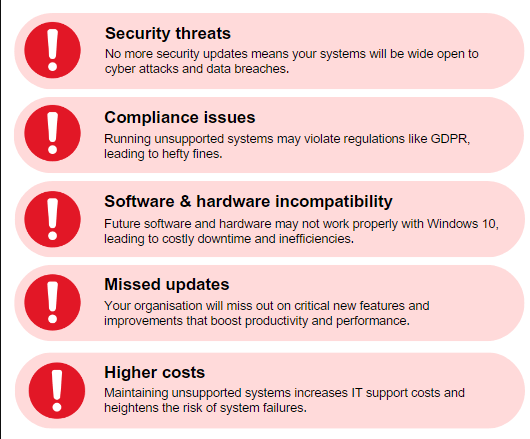
- security threats become a bigger concern
- future software support becomes less certain
- hardware compatibility gets worse over time
- business and school requirements may become stricter
- troubleshooting becomes harder
Even if Windows 10 still works today, it becomes a weaker long-term choice after support ends.
Can You Still Use Windows 10?
Yes, you can still use it.
But using it and relying on it long-term are not the same thing.
If you only need a short transition period while preparing your upgrade, that is one thing. If you plan to stay on Windows 10 for years without making changes, that is much riskier.
So the better question is not:
Can I still use Windows 10?
The better question is:
Should I keep using Windows 10 as my main system now that support has ended?
For most people, the answer is no.
The Biggest Risks of Staying on Windows 10
1. Higher security risk
This is the most important problem.
Unsupported operating systems become easier targets over time because they are no longer maintained in the same way as supported versions.
If you use your PC for:
- school
- shopping
- banking
- personal files
- work documents
then security matters a lot.
2. Software support gets weaker
Some apps will continue to run for a while, but software support always gets worse after the operating system falls out of support.
This can lead to:
- compatibility issues
- missing features
- installation problems
- future update problems
3. Hardware upgrade options get more limited
As time passes, more hardware and drivers are designed mainly for supported systems.
If you are planning:
- a new printer
- a storage upgrade
- new accessories
- a new laptop or desktop purchase
it makes more sense to build around a currently supported version of Windows.
4. Troubleshooting gets harder
When a supported platform becomes older and less current, it is harder to find reliable fixes, support articles, and official help that match your exact setup.
That can waste a lot of time later.
What You Should Do Now
1. Check if your PC can run Windows 11
This is the first thing most users should do.
If your current PC is compatible with Windows 11, upgrading is usually the best next step. It is the most direct way to stay on a supported version of Windows without replacing everything.
This is the ideal path if:
- your PC is still in good condition
- you do not want to buy a new device yet
- you want to stay current with Microsoft support
2. Back up your important files
Before making any big decision, back up your data.
This includes:
- documents
- photos
- videos
- downloads
- desktop files
- browser bookmarks if needed
This matters whether you plan to:
- upgrade to Windows 11
- replace your PC
- reinstall Windows
- keep using Windows 10 a little longer
A backup gives you a safer path no matter what you decide next.
3. Decide whether to upgrade or replace the PC
If your PC supports Windows 11, upgrading usually makes the most sense.
If it does not support Windows 11, then you have two main choices:
- keep using Windows 10 temporarily while planning ahead
- move to a new Windows 11 PC
For a lot of users, this is the real turning point. If your device is already old, slow, or near replacement age, buying a newer Windows 11 system may be the smarter long-term option.
4. Understand ESU before relying on it
Some users will hear about Extended Security Updates, or ESU, and assume that solves everything.
It can help in some situations, but it is not the same as staying fully current on a supported Windows version.
It is better viewed as a temporary option, not the ideal long-term plan for most normal home users.
What About Microsoft 365 and Office?
This is where some people get confused.
Windows support and Office support are related, but they are not exactly the same thing.
Some Office apps may still run on Windows 10 for a while, but that does not automatically make Windows 10 the right platform to stay on. If the operating system itself is no longer fully supported, the bigger problem is still the platform underneath.
So even if Office still opens, that does not mean staying on Windows 10 is the best long-term decision.
Who Should Upgrade Right Away?
You should move quickly if you use your PC for:
- personal or school accounts
- online banking
- work files
- business use
- shopping and payments
- frequent web browsing
- important stored data
In those cases, delaying too long usually creates more risk than benefit.
Who Might Need a Transition Plan?
Some users cannot switch immediately.
That may include people with:
- older hardware
- budget limits
- software tied to a specific setup
- a family PC that cannot be replaced right away
If that is your situation, the best move is to treat Windows 10 as temporary and start planning the transition now rather than later.
A Simple Action Plan
If you want the short version, do this:
- Check whether your PC supports Windows 11
- Back up your files
- Upgrade if the device is compatible
- Replace the PC if it is too old or unsupported
- Avoid treating unsupported Windows 10 as a long-term safe solution
That is the clearest and safest path for most users.
Is It Better to Upgrade or Buy a New PC?
That depends on your hardware.
Upgrade to Windows 11 if:
- your PC supports it
- the device is still fast enough
- you want the lowest-cost path forward
Consider a new PC if:
- your device is old
- it does not meet Windows 11 requirements
- performance is already poor
- you planned to replace it soon anyway
For many people, the Windows 10 support deadline simply speeds up a decision that was already coming.
Quick Verdict
Windows 10 support has ended, and the safest move now is to stop treating it like a current long-term platform.
If your PC supports Windows 11, upgrading is usually the best choice. If it does not, back up your files and start planning for a new supported device. The important thing is to take action now instead of waiting until problems start showing up later.
FAQ
Has Windows 10 support really ended?
Yes, Windows 10 is no longer in its normal supported phase, which means users should now plan their next step instead of treating it like a current long-term platform.
Can I still use Windows 10 after support ends?
Yes, the PC can still work, but that does not make it the best long-term choice. The risks increase over time.
Should I upgrade to Windows 11 now?
If your PC is compatible, upgrading is usually the best option because it keeps you on a supported Windows version.
What if my PC cannot run Windows 11?
If your PC is not compatible, the best path is usually to back up your files and start planning for a newer Windows 11 device.
Stay secure and move forward with confidence by choosing a genuine Windows license with instant delivery and simple activation.