
Instructions
Semantic Search in Windows: What It Means for Everyday Users
Jun
Search in Windows has traditionally worked best when you already knew exactly what you were looking for. If you remembered the file name, the right folder, or the exact setting label, you were usually fine. If you did not, search could feel frustrating.
Semantic search is Microsoft’s attempt to change that.
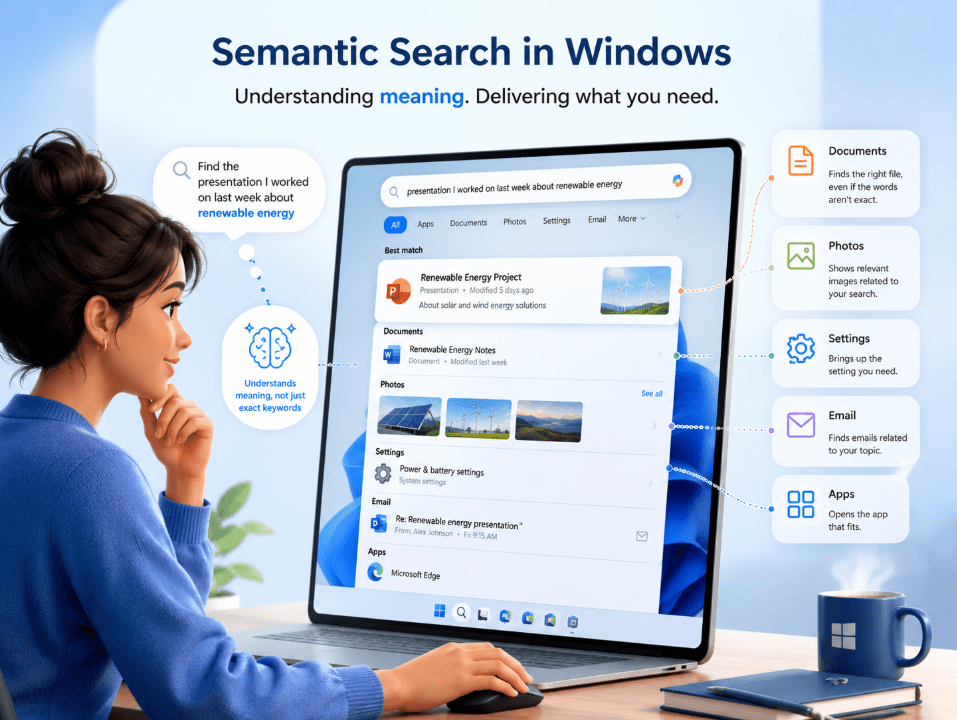
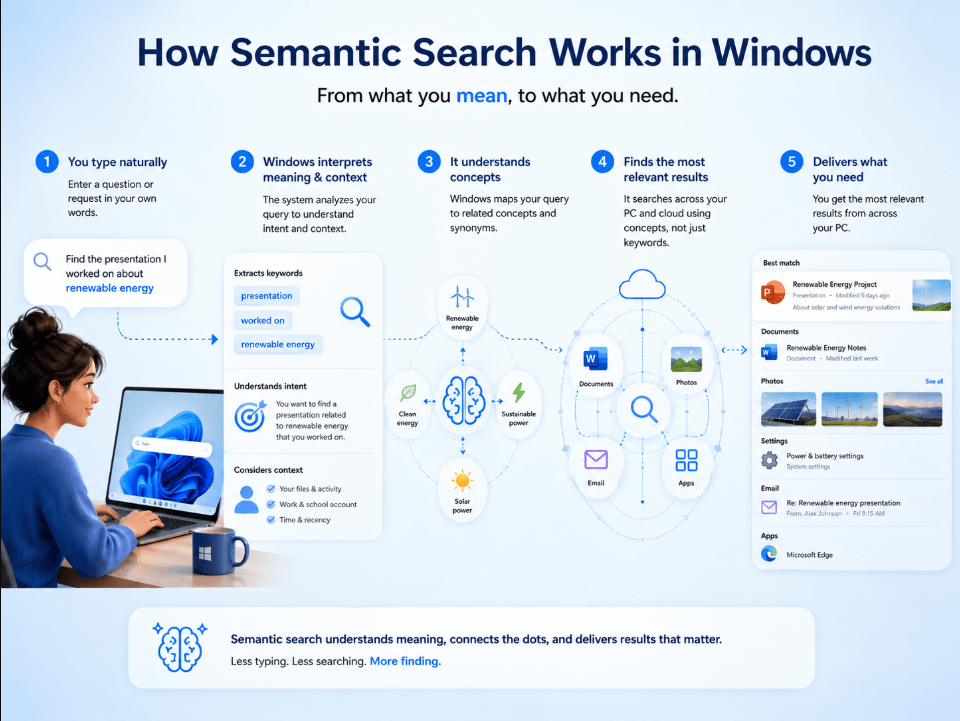
Instead of relying only on exact keywords, semantic search is designed to understand the meaning behind what you type. That means Windows can do a better job of finding documents, photos, and settings even when you do not remember the exact name or wording.
For everyday users, this is one of the most practical Windows improvements in years.
The Short Answer
If you want the simple version:
- semantic search helps Windows understand what you mean, not just what you type
- it makes it easier to find files, photos, and settings using natural language
- it is part of improved Windows Search on Copilot+ PCs
- it works alongside traditional indexing, not instead of it
The easiest way to think about it is this:
semantic search makes Windows Search feel more human and less dependent on perfect keywords.
What Is Semantic Search in Windows?
Semantic search is a smarter way of searching that looks beyond exact matches.
Traditional search usually depends on:
- exact file names
- exact words inside a file
- exact settings names
- close keyword matches
Semantic search tries to understand:
- what you meant
- what the content is about
- what kind of thing you are trying to find
- what you remember, even if your wording is not exact
Microsoft says improved Windows Search on Copilot+ PCs uses semantic indexing together with traditional indexing so users can type what is on their mind instead of needing exact names or phrases.
Why This Matters to Normal Users
Most people do not search like archivists.
They do not remember:
- exact file names
- exact folder locations
- exact words inside documents
- exact labels in Settings
They remember things like:
- “the budget presentation from last month”
- “the setting to change my theme”
- “the beach photos from summer”
- “that document about invoices”
That is exactly the kind of everyday problem semantic search is designed to improve. Microsoft says users can search in more natural ways and no longer need to remember exact file names, content wording, or setting names.
Where Semantic Search Works
Semantic search is not limited to one small part of Windows.
Microsoft says improved Windows Search works in:
- File Explorer
- the Windows Search box on the taskbar
- Settings
That matters because it makes the feature feel built into normal Windows use instead of being some separate AI experiment.
What Can Semantic Search Help You Find?
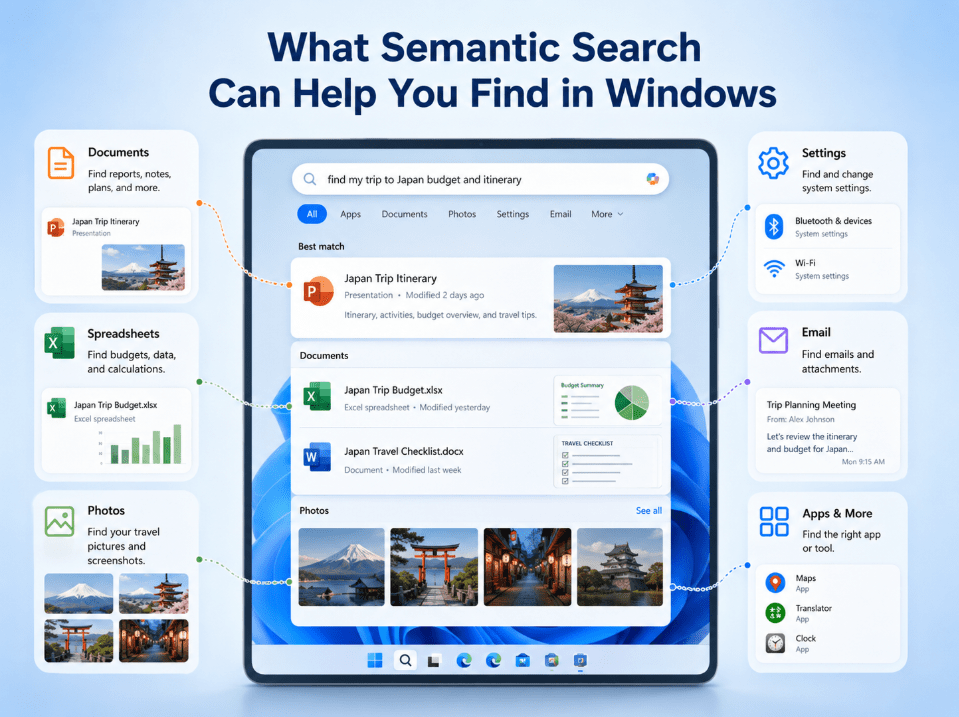
For everyday users, the main use cases are:
Files and documents
You can search by meaning instead of needing the exact file name.
Photos
You can describe what a photo is about instead of relying only on filenames.
Settings
You can type what you want to change, even if you do not know the official settings label.
Microsoft says improved Windows Search helps users find documents, photos, and settings using natural language. It also says cloud-stored photos and files can appear alongside local results on supported Copilot+ PCs.
Is Semantic Search the Same as Improved Windows Search?
Not exactly.
Semantic search is the idea behind the smarter matching.
Improved Windows Search is the broader Windows feature that uses semantic indexing together with traditional indexing.
So the simplest breakdown is:
- semantic search = understanding meaning
- improved Windows Search = the full Windows feature using that smarter search method
Does Semantic Search Replace Traditional Search?
No.
Microsoft says semantic indexing works alongside traditional indexing. That is important because it means Windows is not throwing away normal search behavior. It is adding another layer to make search better.
That is good for users because:
- exact searches still work
- natural-language searches also work better
- Windows can handle more kinds of queries
What Hardware Do You Need?
Right now, this feature is tied to Copilot+ PCs.
Microsoft says these improvements are powered by on-device AI and the 40+ TOPS NPU in Copilot+ PCs. That means not every Windows 11 PC gets the same semantic search experience.
So if someone is using an older or standard Windows 11 laptop, they should not assume they already have the full version of this feature.
Does It Work Offline?
Microsoft says these search improvements on Copilot+ PCs can work even when you are not connected to the internet, thanks to the on-device NPU. That is one of the most interesting parts of the feature because it makes semantic search feel more immediate and local, not just cloud-dependent.
What About Privacy?
Microsoft Q&A content says semantic indexing data for local Windows features on Copilot+ PCs is stored locally on the device, not shared with Microsoft or third parties, and not used to train AI models. That is important because search features that feel “smarter” naturally raise privacy questions.
For everyday users, the practical takeaway is:
- it is designed as an on-device feature
- it is not just sending your searches away to be processed elsewhere
- local indexing still matters
Does Indexing Still Matter?
Yes. A lot.
Microsoft’s search indexing guidance says Windows builds an index of files and properties to make search faster and more efficient. Microsoft also says that on Copilot+ PCs, semantic indexing works together with traditional indexing, and for the best results users should let indexing finish, ideally with the device plugged in during the initial indexing period.
That means semantic search is smarter, but it still depends on Windows having the right content indexed.
Why Semantic Search Feels More Useful Than Flashy AI Features
A lot of AI features sound impressive but do not always improve daily work.
Semantic search is different because it solves a very normal problem:
people forget things.
You may not remember:
- the file name
- the folder
- the setting name
- the wording inside a document
But you usually remember what it was about.
That is why semantic search has a good chance of becoming one of the most useful Windows AI features for regular people.
Who Will Benefit Most?
Semantic search is especially useful for:
- students
- office workers
- remote workers
- people with messy folders
- users who save lots of photos
- users who often search for settings
- people who remember ideas better than filenames
In other words, it helps the kind of user most people actually are.
Who Might Not Notice a Huge Difference?
Some users may not care as much if they:
- keep extremely organized folders
- remember exact filenames
- use very few local files
- do not have a Copilot+ PC
It is still a real improvement, but its value depends a lot on how you search now.
Common Mistakes to Avoid
Assuming it works on all Windows 11 PCs
It does not. The semantic search experience Microsoft describes is part of improved Windows Search on Copilot+ PCs.
Expecting it to work perfectly before indexing finishes
Microsoft says indexing needs time, and best results come after the initial indexing process completes.
Thinking it replaces normal search completely
It does not. Semantic indexing works together with traditional indexing.
Confusing it with Recall
Recall also uses semantic-powered search, but Recall is about finding things you previously saw on your PC, while semantic search in improved Windows Search is about finding files, photos, and settings more naturally.
Quick Verdict
Semantic search in Windows matters because it makes search feel less rigid and more natural. Instead of forcing users to remember exact names and perfect wording, Windows can better understand what they mean.
For everyday users, that could end up being one of the most practical Windows improvements, especially on Copilot+ PCs where it helps find documents, photos, and settings using normal language.
FAQ
What is semantic search in Windows?
Semantic search helps Windows understand the meaning behind your search instead of only relying on exact keywords or names.
Where does semantic search work in Windows?
Microsoft says it works in File Explorer, the taskbar Search box, and Settings on supported Copilot+ PCs.
Do I need a Copilot+ PC for semantic search?
For the improved Windows Search experience Microsoft is describing, yes – it is tied to Copilot+ PCs and their on-device AI hardware.
Is semantic search private?
Microsoft Q&A guidance says semantic indexing data for these local Windows features is stored locally on the device and is not shared with Microsoft or third parties.
Get more from Windows 11 with a genuine license, instant delivery, and simple activation that keeps your PC ready for the latest features.