
Instructions
App Compatibility on Windows on Arm: What Users Should Know
Jun
App compatibility used to be one of the biggest reasons people hesitated about Windows on Arm. That is still the first question many buyers ask now: Will my apps actually work?
In 2026, the answer is much better than it used to be. For many normal users, Windows on Arm can run most of what they need. But the details still matter, because not every app behaves the same way and some categories still need extra checking before you buy.
The Short Answer
If you want the quick version:
- most Windows apps can run on Windows on Arm
- native Arm64 apps work best
- many x86 and x64 apps run through Prism emulation
- a lot of everyday apps now work well enough for normal users
- some categories still need checking first, especially apps tied to drivers, anti-cheat systems, antivirus tools, or specialized hardware
So the honest answer is:
Windows on Arm app compatibility is now good enough for many everyday users, but you still should not assume every old or specialized app will work perfectly without checking.
How App Compatibility Works on Windows on Arm
Windows on Arm supports software in more than one way.
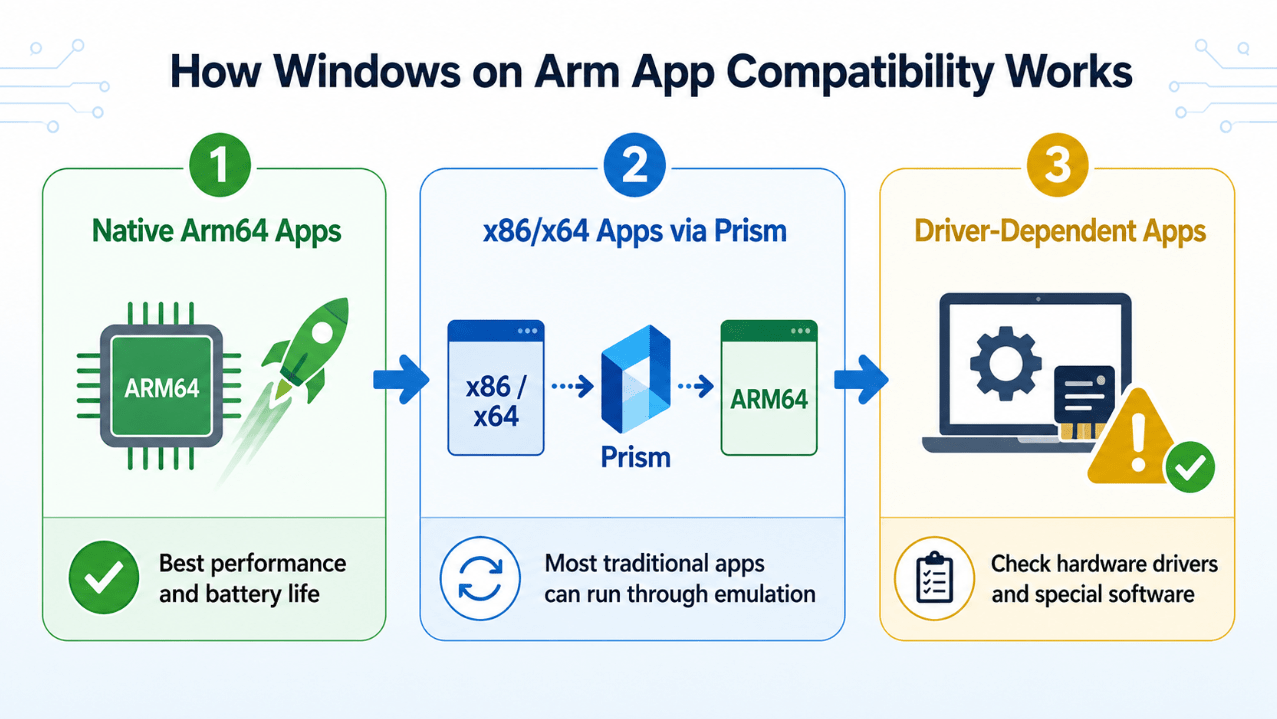
1. Native Arm64 apps
These are apps built specifically for Arm-based Windows PCs. Microsoft says these apps provide the best performance and the best battery life. If an app has a proper native Arm64 version, that is usually the best-case scenario.
2. x86 and x64 apps through emulation
Microsoft says Windows 11 on Arm supports both x86 and x64 app emulation. That means many traditional Windows apps can still run even if they were not rebuilt for Arm. This is one of the biggest reasons Windows on Arm has become much more usable than before.
3. Driver-dependent apps
This is where more caution is needed. If an app depends on a hardware driver, kernel-level component, low-level system hook, or special peripheral support, compatibility depends on whether the required driver or component exists for Arm. Microsoft specifically advises checking with the hardware or software vendor in these cases.
What Is Prism and Why Does It Matter?
Prism is Microsoft’s newer emulation technology for Windows on Arm. Microsoft says Prism improves performance for emulated applications on Windows 11 version 24H2 and supports running both x86 and x64 apps. Microsoft also says Prism includes optimizations intended to keep emulated apps fast and usable.
That matters because older Windows on Arm criticism was often about software running too slowly or too unreliably. Better emulation means many users can now run mainstream apps without thinking much about architecture at all.
What Usually Works Well
For many people, these categories are now the easiest fit on Windows on Arm:
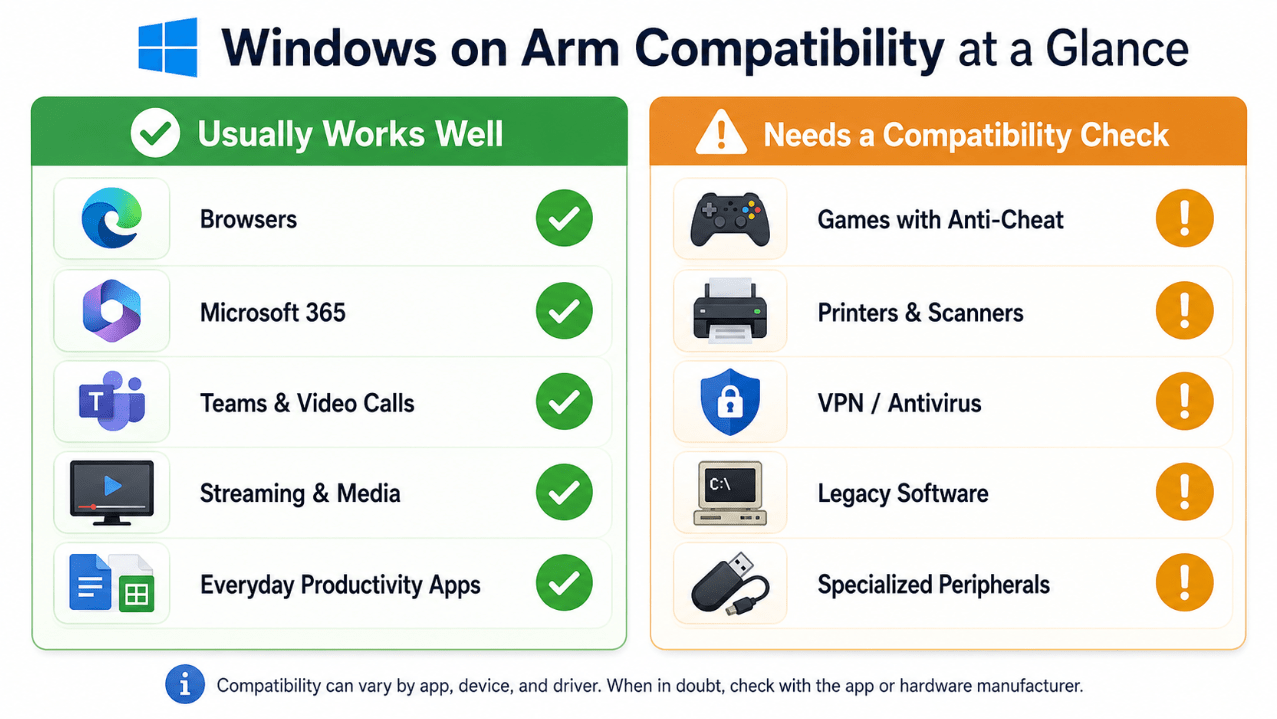
Web browsers
Modern browsers are one of the strongest use cases. Browsing, web apps, cloud tools, and everyday internet use are generally a comfortable fit for the platform. Microsoft says most apps can run, and browsers are part of the mainstream Windows software experience that benefits from either native support or mature emulation.
Microsoft 365 and everyday productivity
Word, Excel, PowerPoint, Outlook, Teams, OneNote, and similar daily productivity tools are among the most important reasons Windows on Arm is more practical now. Microsoft says many of the top Windows apps are already rebuilt for Arm-based PCs.
Video calls and collaboration apps
Mainstream communication and collaboration tools are much more realistic on Windows on Arm than before, especially when they already have modern app support.
Streaming and media apps
For normal entertainment and everyday media use, Windows on Arm is now a very comfortable platform.
General productivity apps
If your workflow is based on common office software, browsing, email, notes, PDFs, and modern app ecosystems, Windows on Arm compatibility is usually strong enough to be practical.
What Still Needs a Compatibility Check
This is the part users should not ignore.
Games with anti-cheat systems
Microsoft says some games and apps may not work if they rely on anti-cheat drivers that are not made for Windows 11 Arm-based PCs. This is one of the clearest official warnings Microsoft gives, and it is one of the biggest reasons gamers still need to check game-by-game.
Third-party antivirus software
Microsoft says some third-party antivirus software cannot be installed unless it has been made or updated for Arm-based PCs. Microsoft notes that Windows Security still helps protect supported Windows 11 devices, but users who depend on a specific third-party security suite should check compatibility first.
Printers, scanners, and peripherals
Microsoft says many printers work, especially those using Mopria or supported printer apps, but peripherals depend on whether the necessary drivers are built into Windows or released as Arm64 drivers by the hardware maker. So printers, scanners, USB accessories, docking gear, and similar hardware should be verified first.
Legacy or niche software
If you depend on an older program that has not been updated in years, or something specialized for a very specific job, compatibility may be less predictable. It may still run, but it is smarter to verify before you buy than to assume.
Low-level or specialized business tools
Apps that depend on special drivers, system-level integrations, enterprise security layers, or unusual hardware often need extra checking.
Native vs Emulated Apps: What Users Should Prefer
The safest preference order is usually:
- Native Arm64 app
- Well-supported x64/x86 app through Prism
- Older app with unclear driver or hardware dependency
That does not mean emulated apps are bad. Microsoft’s current guidance shows emulation is now a core part of the Windows on Arm story. But native apps still give the best experience for speed, efficiency, and battery life.
Is App Compatibility Still a Real Problem?
For some users, yes. For many others, not in the same way as before.
If your use looks like:
- browser work
- Microsoft 365
- documents
- video calls
- streaming
- mainstream apps
then app compatibility is much less of a blocker than it used to be.
If your use depends on:
- obscure old software
- gaming with anti-cheat tools
- special accessories
- custom drivers
- uncommon enterprise tools
then compatibility is still something you need to check carefully.
What Users Should Check Before Buying
Before buying a Windows on Arm PC, the smartest checklist is:
- check if your must-have apps have native Arm64 versions
- check whether your older apps run well through Prism
- check your printer, scanner, dock, or USB accessory support
- check any antivirus, VPN, or security software you rely on
- check game compatibility if gaming matters to you
- check vendor pages for driver availability
This is especially important if you use the laptop for work, school, or travel and need your setup to work immediately.
Who Can Buy With More Confidence?
Windows on Arm is easier to recommend now for:
- students
- remote workers
- Microsoft 365 users
- general home users
- travelers
- people who mostly use mainstream apps and services
These users are much more likely to have a smooth experience.
Who Should Be More Careful?
You should check more carefully if you are:
- a gamer
- dependent on older legacy software
- using unusual business tools
- tied to a specific antivirus or VPN tool
- reliant on driver-heavy hardware or peripherals
For these users, Windows on Arm may still be a good choice, but it should not be a blind purchase.
Quick Verdict
App compatibility on Windows on Arm is much better than it used to be. Microsoft now supports a much broader range of apps through a combination of native Arm64 software and improved x86/x64 emulation with Prism. For many mainstream users, that is enough to make Windows on Arm a real everyday platform.
But compatibility is not something to assume automatically. If your setup depends on anti-cheat games, special drivers, old business software, or niche accessories, you should still verify those parts first. The platform is far more practical now, but smart buyers still check before they switch.
FAQ
Can Windows on Arm run normal Windows apps?
Yes. Microsoft says most Windows apps can run on Windows 11 Arm-based PCs, with native Arm apps giving the best performance and x86/x64 apps supported through emulation.
What is Prism on Windows on Arm?
Prism is Microsoft’s emulation technology in Windows 11 24H2 that improves performance for emulated x86 and x64 apps on Arm-based PCs.
Do games work on Windows on Arm?
Some do, but Microsoft warns that games relying on anti-cheat drivers may not work unless those drivers are made for Windows on Arm.
Do printers and accessories work on Windows on Arm?
Many do, but Microsoft says peripherals depend on whether Windows includes the needed drivers or the manufacturer has released Arm64 drivers.
Choose the right Windows laptop with confidence and get a genuine Windows license with instant delivery and simple activation.