
Instructions
Cloud Download vs Local Reinstall in Windows 11
Aug
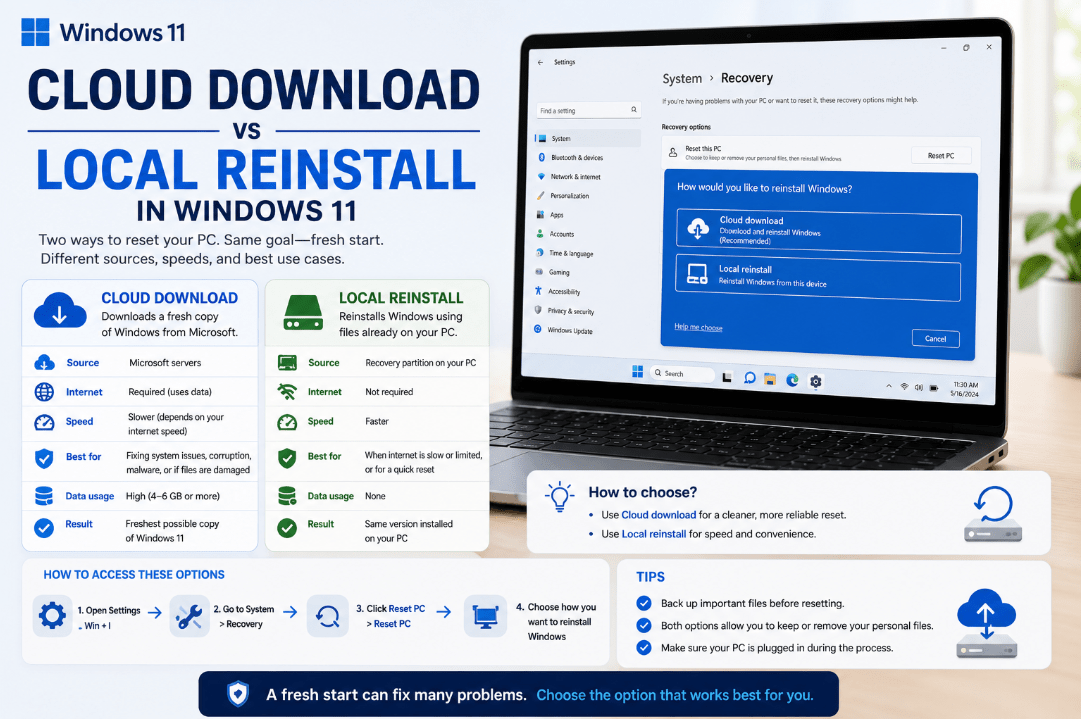
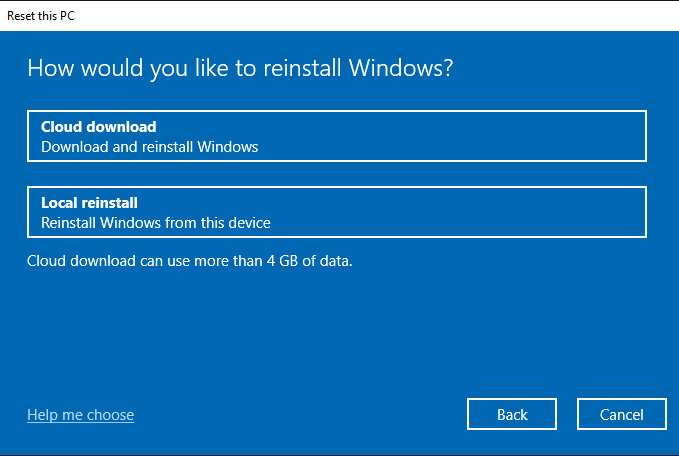
When resetting Windows 11, you’ll usually be asked to choose between Cloud Download vs Local Reinstall.
Both options reinstall Windows, but they get the installation files in different ways. Choosing the right one depends mainly on your internet connection and whether your existing Windows files may be damaged.
What Is Cloud Download?
Cloud Download downloads a fresh copy of Windows from Microsoft’s servers and uses those files to reinstall the operating system.
This can be useful if Windows system files stored on your computer are corrupted or missing. Microsoft also notes that Cloud Download provides a fresh Windows copy with current updates.
Cloud Download is a good choice when:
- Windows appears damaged or unstable
- Previous reset attempts have failed
- You have a reliable internet connection
- You want fresh Windows installation files
The main disadvantage is that it requires an internet connection and downloads several gigabytes of data.
What Is Local Reinstall?
Local Reinstall uses Windows files that are already stored on your computer.
Because it doesn’t need to download a new Windows copy, it can be useful when your internet connection is slow, limited, or unavailable.
Microsoft notes that Local Reinstall may be faster with a slow internet connection, although the local files may not contain the latest updates.
Local Reinstall is a good choice when:
- Your internet connection is slow
- You want to avoid a large download
- Windows is generally working correctly
- Your local Windows files are not damaged
Cloud Download vs Local Reinstall: What’s the Difference?
The main differences are straightforward:
| Feature | Cloud Download | Local Reinstall |
|---|---|---|
| Installation source | Microsoft servers | Files already on your PC |
| Internet required | Yes | Usually no |
| Download required | Yes | No large Windows download |
| Useful for corrupted local files | Yes | Less suitable |
| Latest installation files | Generally better | May require more updates afterward |
Both methods ultimately reinstall Windows 11.
Which Option Should You Choose?
For many users, Cloud Download is the better choice when troubleshooting serious Windows problems because it doesn’t depend on the existing Windows installation files.
Choose Local Reinstall when your PC is working reasonably well and you mainly want to reset Windows without downloading a new copy.
If your internet connection is limited, Local Reinstall can also be more convenient.
How to Find These Options in Windows 11
To reset Windows 11:
- Open Settings.
- Go to System.
- Select Recovery.
- Find Reset this PC.
- Click Reset PC.
- Choose whether to Keep my files or Remove everything.
- Select Cloud download or Local reinstall.
Microsoft recommends backing up important files before resetting your PC. If your device uses encryption, you should also make sure you have access to your BitLocker recovery key.
Does Cloud Download Delete Your Files?
Choosing Cloud Download does not automatically determine whether your personal files are deleted.
That is controlled by the earlier Reset this PC option:
Keep my files reinstalls Windows while keeping personal files, but removes installed apps and resets settings.
Remove everything reinstalls Windows and removes personal files, apps, and settings.
So Cloud Download and Local Reinstall simply determine where Windows gets the files used for reinstallation.
Is Cloud Download a Clean Installation?
Not exactly.
Cloud Download is part of the Reset this PC feature. A traditional clean installation usually involves Windows installation media and can completely erase the existing Windows installation.
Microsoft treats Reset and a full Windows reinstall as separate recovery options.
Summary
When comparing Cloud Download vs Local Reinstall, neither option is always better.
Whichever option you choose, back up important files before starting the reset.
Need Windows 11 for a new or reinstalled PC? Explore our Windows 11 keys and choose the right edition for your computer today.