
Instructions
Windows 11 24H2 End of Support: What Home and Pro Users Should Do Now
Oct
The Windows 11 24H2 end of support date has arrived for Home and Pro users.
Microsoft ended updates for Windows 11 version 24H2 Home and Pro on October 13, 2026. The October 2026 security update is the final monthly update for these editions.
Your PC will not suddenly stop working, and your files and applications will not disappear. However, staying on 24H2 means your PC will no longer receive the normal security and quality updates that keep Windows protected and reliable.
Here is what 24H2 users need to know and what you should do next.
What Does Windows 11 24H2 End of Support Mean?
End of support does not mean Microsoft remotely disables Windows.
Your computer can continue to start and run Windows 11 24H2 normally.
The important change is that Home and Pro editions no longer receive regular servicing.
Microsoft says affected devices will no longer receive normal monthly security updates, non-security preview updates, fixes for known issues, time-zone updates, or standard technical support for version 24H2.
That makes continuing to use 24H2 increasingly risky over time.
A newly discovered Windows vulnerability, for example, could be fixed in newer supported Windows versions while remaining unpatched on your 24H2 installation.
When Did Windows 11 24H2 Support End?
For Windows 11 Home and Pro, version 24H2 reached end of updates on:
October 13, 2026
Microsoft released the final monthly security update for these editions on that date.
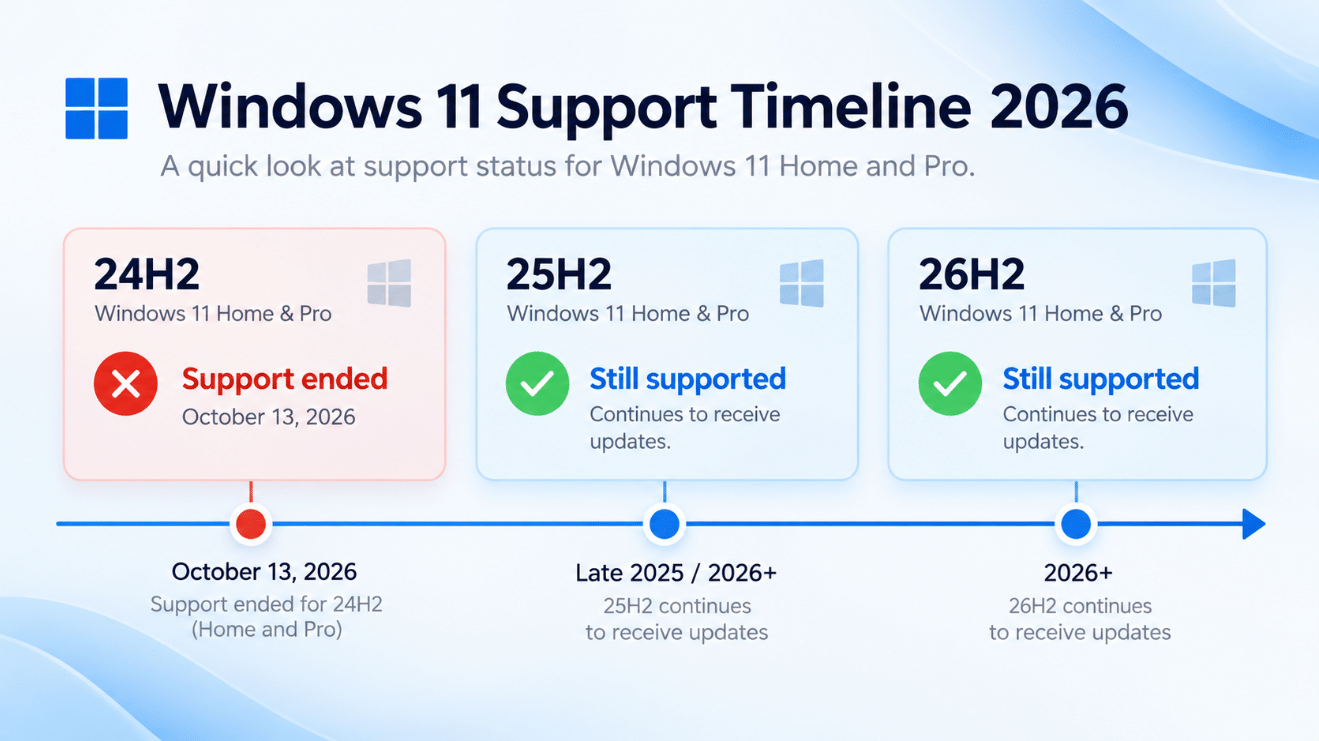
The timeline for current Home and Pro releases now looks like this:
| Windows 11 version | Home/Pro support status |
| 24H2 | Ended October 13, 2026 |
| 25H2 | Supported until October 12, 2027 |
| 26H2 | Supported until October 2028 |
Windows 11 26H2 became generally available on September 29, 2026 and is now Microsoft’s newest Windows 11 feature release.
Does Windows 11 24H2 Still Work?
Yes.
If you start a Windows 11 24H2 computer today, it should continue working normally.
You can still open applications, browse the web, play games, access your files, and use the computer.
End of support primarily means future updates stop arriving.
The problem therefore becomes larger with time rather than immediately on the end-of-support date.
A 24H2 PC may seem completely normal today, but several months without new security fixes can create unnecessary exposure.
How to Check If You Are Running Windows 11 24H2
Before doing anything, confirm which Windows version is installed.
Press:
Windows + R
Type:
winver
and press Enter.
A small window will display your Windows 11 version and OS build.
If it says:
Version 24H2
and you are using Windows 11 Home or Pro, your version has reached end of support.
You can also check under:
Settings → System → About → Windows specifications
What Should Windows 11 24H2 Users Do Now?
The best solution is to move to a supported Windows 11 version.
Open:
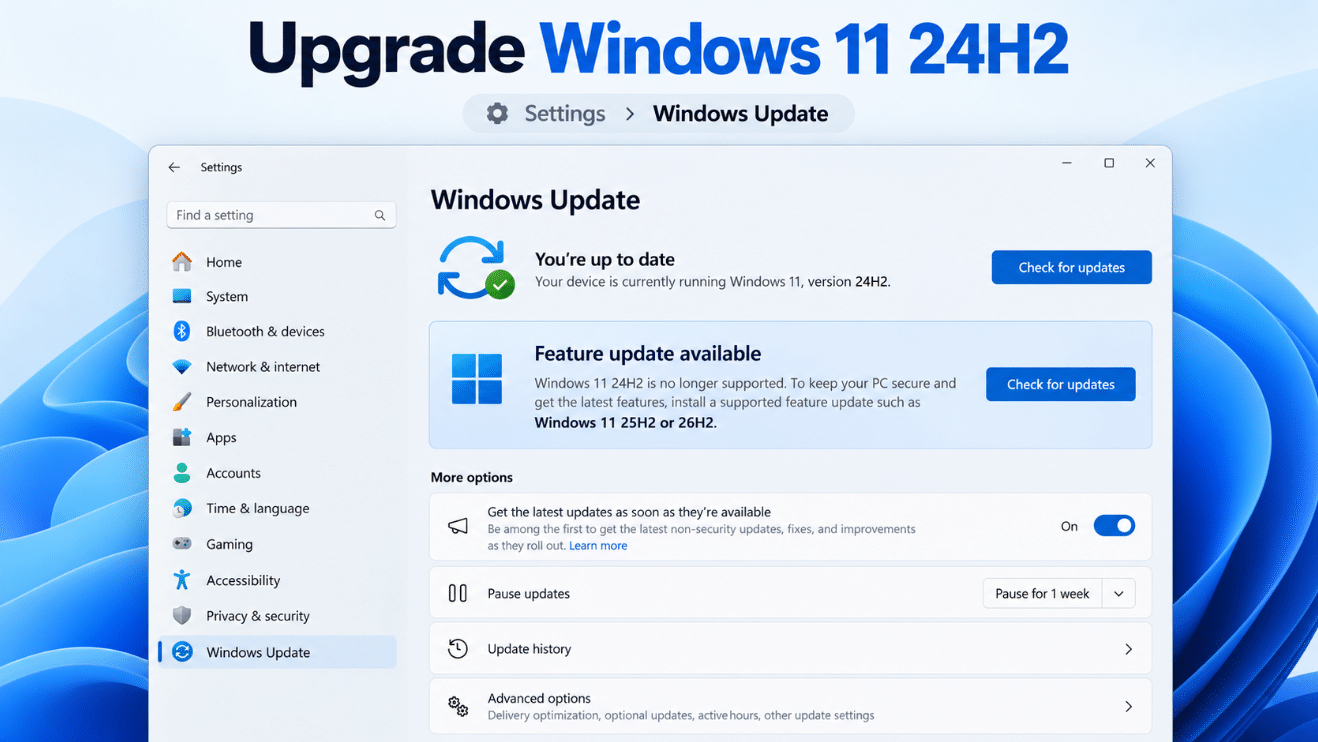
Settings → Windows Update
Then select:
Check for updates
If Windows 11 26H2 is available for your computer, Windows may offer it directly.
Microsoft says 26H2 is being delivered through a phased rollout, which means not every eligible PC receives it at exactly the same time. Eligible devices running either 24H2 or 25H2 can move to 26H2.
If Windows Update offers a newer supported Windows version, install it.
Can You Upgrade Directly From 24H2 to 26H2?
Yes, on eligible PCs.
Windows 11 versions 24H2, 25H2, and 26H2 share the same core operating-system foundation.
Microsoft provides an enablement package that can activate the 26H2 features on supported 24H2 or 25H2 installations with a relatively quick update process and a single restart.
That makes the transition significantly easier than reinstalling Windows from scratch.
However, 26H2 availability is still being expanded gradually.
If Windows Update does not offer it yet, this does not automatically mean something is wrong with your PC.
What If Windows Update Only Offers 25H2?
Windows 11 25H2 is still supported.
Microsoft’s lifecycle currently lists Home and Pro support for 25H2 through October 12, 2027.
So if your PC is offered 25H2 instead of 26H2, moving to 25H2 still puts you back onto a supported Windows release.
You can then receive 26H2 later when Microsoft determines that the newer version is ready for your device.
Why Is Windows 11 26H2 Not Showing Up?
Microsoft does not release major Windows updates to every computer simultaneously.
The rollout is phased partly so Microsoft can identify compatibility problems before an update reaches every device.
An upgrade may therefore be delayed because of your hardware, drivers, software, or a temporary safeguard hold.
Do not immediately force the update using unofficial tools if Windows Update is deliberately holding it back.
Instead, keep installing normal Windows updates and check Microsoft’s Windows release-health information for known compatibility problems.
Will Windows Automatically Upgrade 24H2?
For many consumer PCs, Windows Update can automatically move an unmanaged Home or Pro device to a newer supported release.
Microsoft had already been automatically offering Windows 11 25H2 to eligible unmanaged 24H2 Home and Pro PCs as 24H2 approached end of support.
With Windows 11 26H2 now available, eligible 24H2 and 25H2 devices are also being included in its phased rollout.
You may still be able to choose when to restart the computer and complete the installation.
Do You Need a New Windows Key to Upgrade?
No – not simply because you are moving from Windows 11 24H2 to a newer Windows 11 feature version.
If your current Windows 11 Home or Pro installation is already properly activated, installing a supported feature update such as 25H2 or 26H2 normally does not require you to purchase another product key.
Your Windows edition also normally remains the same.
For example:
Windows 11 Pro 24H2 → Windows 11 Pro 26H2
is a Windows feature update, not a new license purchase.
You would need to consider a different license if you were making a separate edition change, such as moving from Windows 11 Home to Pro.
Will Updating Delete Your Files or Apps?
A normal Windows feature update is designed to keep your:
- Personal files
- Installed applications
- User accounts
- Most Windows settings
However, any major operating-system update carries some risk.
Before installing it, make sure important files are backed up.
If you use Windows Backup, OneDrive, or another backup solution, confirm that your important documents are protected before starting.
Should You Stay on 24H2 Because It Works Fine?
That is not recommended.
A common reason users delay Windows feature updates is that their existing installation feels stable.
But after the Windows 11 24H2 end of support, the issue is no longer whether 24H2 works today.
The question is whether you want to continue using an operating system version that is no longer receiving the latest security fixes.
For an internet-connected everyday PC, moving to a supported release is the safer choice.
Does This Affect Windows 11 Enterprise and Education?
Not on the same schedule.
The October 13, 2026 deadline applies specifically to consumer-oriented editions such as Windows 11 Home and Pro.
Microsoft says Windows 11 24H2 Enterprise and Education remain supported until October 12, 2027.
This longer lifecycle is normal for Enterprise and Education Windows releases.
So an organization running Windows 11 Enterprise 24H2 should follow its IT department’s deployment plan rather than assuming the Home/Pro deadline applies.
What About Windows 11 SE?
Windows 11 version 24H2 was also the final supported Windows 11 release for Windows 11 SE.
Microsoft’s lifecycle documentation identifies 24H2 as the last Windows 11 SE version.
This is primarily relevant to education devices rather than typical Home and Pro PCs.
What If Your PC Cannot Upgrade?
First check Windows Update.
If a newer version does not appear, make sure all current updates are installed and restart the computer.
Then check for updated BIOS/UEFI firmware and hardware drivers from the PC or motherboard manufacturer.
If Microsoft has placed a compatibility hold on your device, it is usually better to wait for the issue to be resolved rather than bypassing the protection.
An older device that genuinely cannot run a supported Windows 11 release may eventually need a hardware upgrade or replacement.
Is Windows 11 25H2 or 26H2 Better to Install?
As of October 2026, 26H2 is the newest Windows 11 release.
If Windows Update offers 26H2 to your 24H2 PC, that is the logical upgrade because it gives you the longest remaining support period.
If only 25H2 is available, there is no need to panic.
25H2 remains supported through October 2027 and can serve as a supported step before your device receives 26H2.
The most important thing is to move away from unsupported 24H2.
Frequently Asked Questions
Is Windows 11 24H2 still supported?
Not for Home and Pro. Support ended on October 13, 2026. Enterprise and Education 24H2 remain supported longer.
Will Windows 11 24H2 stop working?
No. The operating system can continue working, but Home and Pro no longer receive normal monthly security and quality updates.
What was the last Windows 11 24H2 Home and Pro update?
Microsoft says the October 2026 monthly security update is the final update for Windows 11 24H2 Home and Pro.
Can I upgrade from Windows 11 24H2 directly to 26H2?
Yes, if your PC is eligible and Microsoft has made 26H2 available to it through the phased rollout.
Is Windows 11 25H2 still safe to use?
Yes. Windows 11 25H2 Home and Pro remain supported until October 12, 2027.
Do I need a new Windows 11 product key?
No. Updating an already activated installation from one Windows 11 feature version to another does not normally require a new product key.
Final Thoughts
The Windows 11 24H2 end of support is now official for Home and Pro users.
Your computer will not stop working, but remaining on 24H2 means missing future security fixes, quality improvements, and supported servicing.
Open Settings → Windows Update → Check for updates and install a supported Windows version when it is offered.
Windows 11 26H2 is now the newest release, while Windows 11 25H2 also remains supported if that is the version currently available for your device.
If you’re setting up a new PC or upgrading from Windows Home to Pro, explore our Windows 11 Pro key options and choose the right license for your system.