
Instructions
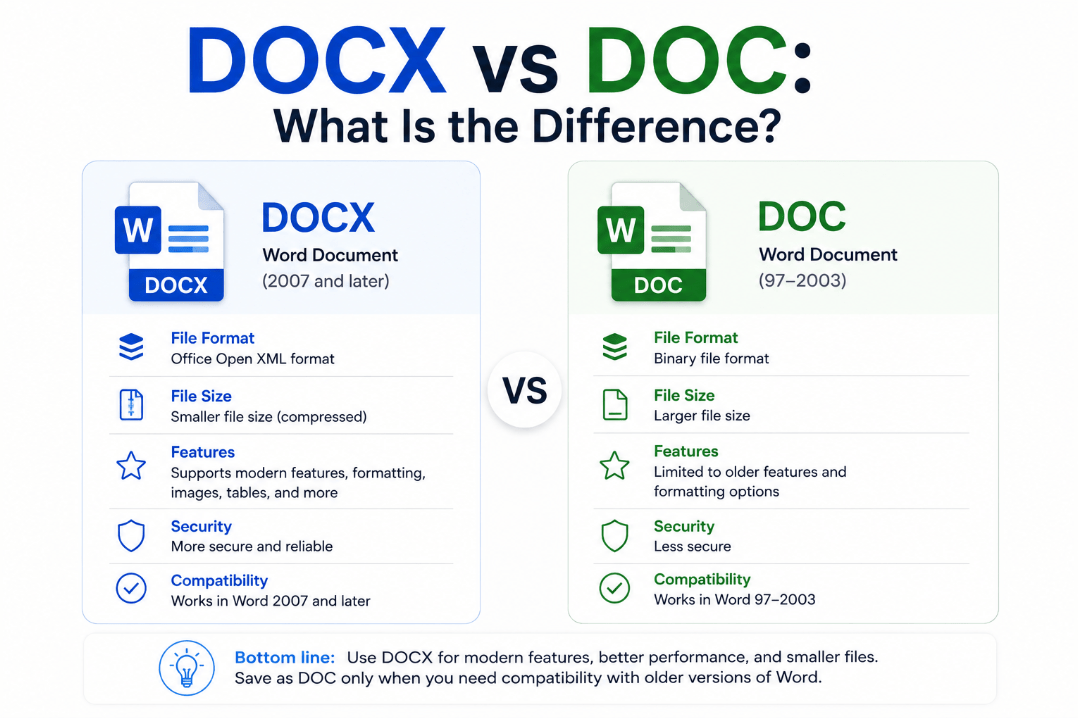
DOCX vs DOC: What Is the Difference?
Aug
If you regularly use Microsoft Word, you’ve probably encountered documents ending in .docx and .doc.
Both are Microsoft Word file formats, but they come from different generations of Office. The main DOCX vs DOC difference is that DOCX is the modern format, while DOC is an older format mainly kept for compatibility with older versions of Word.
What Is a DOC File?
DOC is the older Microsoft Word document format.
It was the standard format used by Word 97 through Word 2003 and stores document information using an older binary file structure.
A DOC file can contain:
- Text
- Images
- Tables
- Formatting
- Headers and footers
- Macros
- Other Word content
Modern versions of Word can still open DOC files, making it possible to work with documents created many years ago.
What Is a DOCX File?
DOCX became Microsoft’s standard Word document format with Word 2007.
Unlike DOC, it uses Microsoft’s Office Open XML format. DOCX remains the default format when saving a normal document in current versions of Microsoft Word.
If you create a new Word document today and select Save, it will normally be saved with the .docx extension.
DOCX vs DOC: Quick Comparison
| Feature | DOCX | DOC |
|---|---|---|
| Introduced | Word 2007 | Word 97 |
| Current Word standard | Yes | No |
| File structure | Open XML | Binary |
| Modern Word features | Better support | More limited |
| Very old Word compatibility | Limited | Better |
| VBA macros | No | Yes |
| Best for new documents | Yes | Usually no |
For most users, DOCX is the better choice for new Word documents.
Why Did Microsoft Replace DOC?
Microsoft introduced the Office Open XML formats with Office 2007.
The newer structure separates different parts of the document, such as text, formatting, settings, and images, inside a packaged file rather than storing everything in the older binary format.
This modern format also makes it easier for software other than Word to work with document contents.
Are DOCX Files Smaller?
DOCX files can often be more storage-efficient because the Open XML package uses compression.
However, file size still depends heavily on what the document contains.
A Word document filled with high-resolution pictures, for example, can still become very large regardless of whether it uses DOCX.
For normal text-based documents, DOCX is generally the more modern and efficient format.
Can DOCX Files Contain Macros?
A normal DOCX file cannot store VBA macro code. Microsoft specifically separates macro-enabled Word files into another format.
If your modern Word document contains macros, it should normally use:
.docm
The extensions are easy to remember:
- DOCX – normal modern Word document
- DOCM – modern Word document containing macros
- DOC – older Word 97–2003 document
If Word warns that macros will be removed when saving as DOCX, choose DOCM if you need to preserve them.
Can Modern Word Open DOC Files?
Yes.
Current versions of Microsoft Word can still open the older DOC format.
When working with an older document, however, Word may use Compatibility Mode.
Compatibility Mode limits certain newer Word features so the document can remain compatible with the older file format.
If you no longer need to use the document with very old versions of Word, converting it to DOCX can remove many of these limitations.
How to Convert DOC to DOCX
You can convert an old Word document without using an online converter.
Open the DOC file in Microsoft Word, then:
- Click File.
- Select Save As.
- Choose where to save the document.
- Select Word Document (*.docx).
- Click Save.
Word creates a DOCX version of the document.
For important or heavily formatted documents, quickly review the new file afterward to make sure everything still appears correctly.
When Should You Still Use DOC?
There are fewer reasons to create a new DOC file today.
The format may still be useful when:
- Sharing documents with very old versions of Word
- Working with legacy business software
- Using an older document-management system
- Opening archived company files
- Working with software that only exports DOC
For normal use with current Microsoft Office versions, DOCX is usually the better option.
What About RTF and ODT?
Word also supports other document formats.
RTF is a more basic Rich Text Format supported by many word processors.
ODT is the OpenDocument Text format commonly associated with applications such as LibreOffice and OpenOffice.
Word can work with these formats, but some formatting or Word-specific features may behave differently when a document is saved outside Word’s native DOCX format.
Which Format Should You Use?
For almost every new Microsoft Word document, choose DOCX.
It is the current standard, works with modern versions of Word, and supports newer Word capabilities.
Use DOC mainly when you specifically need compatibility with older software.
If your document contains VBA macros, use DOCM instead of DOCX.
Summary
The DOCX vs DOC difference is mainly about modern versus older Microsoft Word formats.
Unless you have a specific reason to support old software, DOCX is the better format for creating, editing, and sharing Word documents today.
Need Microsoft Office with Word for your PC? Explore our Microsoft Office keys and choose the version that fits your needs today.