
-
×
 Windows 10 Pro for 5 PCs
1 × €79,99
Windows 10 Pro for 5 PCs
1 × €79,99
Windows 10 Home Product Key
- License
- Retail · 1 PC
- Delivery
- Instant, by e-mail
- Download
- Official Microsoft
- Brand
- Microsoft
€22,99
One-time payment · no subscription
- Instant delivery to your e-mailkey + download links
- Key won't activate? We replace itunused keys: refund within 7 days
- Official invoice with every order
- 24/7 live chat help with activation
Pay with SKU WIN10HOME
One Windows 10 Home key for one PC, for a fresh install or a copy that isn’t activated yet. You pay once and nothing renews.
What you get with Windows 10 Home
One Windows 10 Home key for one PC, for a fresh install or a copy that isn’t activated yet. You get the key and Microsoft’s download link by e-mail, usually within minutes of payment, plus a PDF invoice. You pay once and nothing renews.
What Windows 10 Home covers
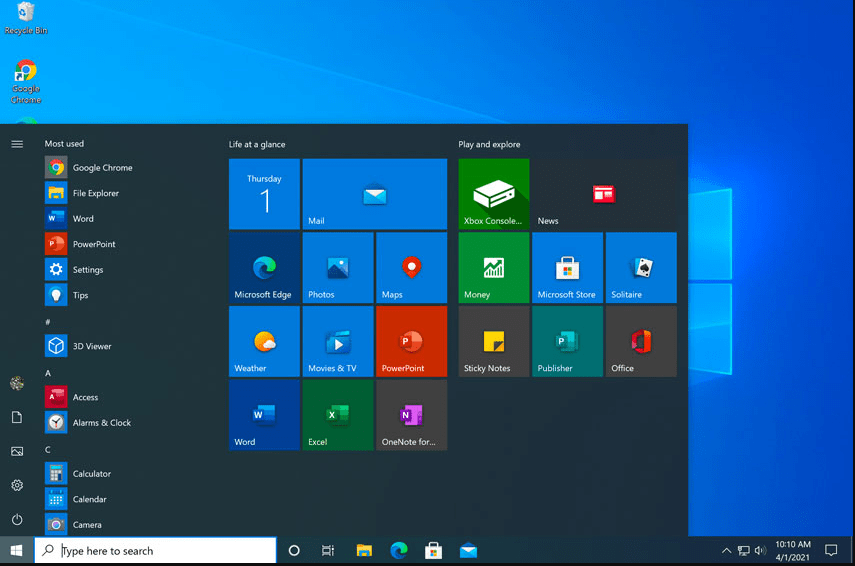
Home is the consumer edition of Windows 10, meant for a personal or family computer. Out of the box it gives you:
- Windows Security. Microsoft Defender Antivirus and the Windows firewall are built in and switched on.
- Device encryption. Where the hardware qualifies, the system drive is encrypted automatically and the recovery key is stored with your Microsoft account.
- Windows Hello. Face or fingerprint sign-in on PCs that have the right camera or reader.
- Task View. Separate virtual desktops keep, say, schoolwork and games apart on one screen.
Home, Pro or Windows 11 Home
Windows 10 Home has no BitLocker, can’t host Remote Desktop sessions, and can’t join a work domain or run Hyper-V. A home office that needs any of these is better served by a Windows 10 Pro key. If the computer has TPM 2.0, Secure Boot and a processor on Microsoft’s Windows 11 list, look at a Windows 11 Home key instead. Windows 10 Home remains the edition for PCs that don’t pass those checks.
How to activate your Windows 10 Home key
- Download the Media Creation Tool from the Microsoft page linked in your e-mail and let it build a bootable USB drive or an ISO file.
- Boot the PC from the USB drive. Enter the key on the product key screen, or select “I don’t have a product key” and then Windows 10 Home.
- If Windows 10 Home is already installed but not activated, go to Start → Settings → Update & Security → Activation, click Change product key and type in the 25-character key.
- Confirm that the Activation page reports a digital license. Adding your Microsoft account on the same page makes a later reactivation easier.
Our guide to installing and activating Windows 10 Home shows these steps with screenshots; if activation fails with an error, our 24/7 support on live chat or e-mail helps.
System requirements
| CPU | 1 GHz or faster, or a system on a chip |
|---|---|
| Memory | 1 GB (32-bit) or 2 GB (64-bit) |
| Hard disk | 32 GB or more for newer Windows 10 versions |
| Graphics card | DirectX 9 or later, WDDM 1.0 driver |
| Screen resolution | 800 x 600 minimum |
Questions about Windows 10 Home
Can I use this key on a PC where Windows 10 Pro is installed?
No. A Home key activates the Home edition, and Microsoft doesn’t support changing Pro down to Home with a key. Reinstall from the USB drive and pick the Home edition when setup lists them.
Will I need the key again after reinstalling?
Not on the same PC. Microsoft says a computer that was activated before picks up its digital license again during a reinstall, so you can skip the product key screen.
What if the key is rejected?
Check that you installed the Home edition, then send the error code to our support team via chat or e-mail, any time of day; they help you finish or replace the key.
2 reviews for Windows 10 Home Product Key
Add a review
You must be logged in to post a review.
- Genuine Retail licenses. Every key is a genuine license that activates with Microsoft, or with ESET or Avast for antivirus. Unless the License line next to the price says OEM, it is a Retail license.
- Replacement if a key won't activate. Contact our support on live chat or by e-mail, day or night: we help you finish the activation or send a replacement key.
- Refund for unused keys. A key that has not been redeemed can be refunded within 7 calendar days of purchase, as set out in our Refund Policy.
- Invoice and instructions. Every order comes with a PDF invoice and instructions to download, install and activate the software.
You may also need
jerzy –
super
MAC-GYVER –
J’ai installé déjà Office 2020 via le m^m principe et pas de problème nickel…et fait de m^m avec Windows 10 et suis très satisfait … juste un petit bémol tout est en anglais obligé de passe par un traducteur