
-
×
 Visio 2021 Professional for 5 PCs
1 × €109,99
Visio 2021 Professional for 5 PCs
1 × €109,99
Project 2016 Professional (1PC)
- License
- Retail · 1 PC
- Delivery
- Instant, by e-mail
- Download
- Official Microsoft
- Brand
- Microsoft
€25,00
One-time payment · no subscription
- Instant delivery to your e-mailkey + download links
- Key won't activate? We replace itunused keys: refund within 7 days
- Official invoice with every order
- 24/7 live chat help with activation
Pay with SKU PROJ_16
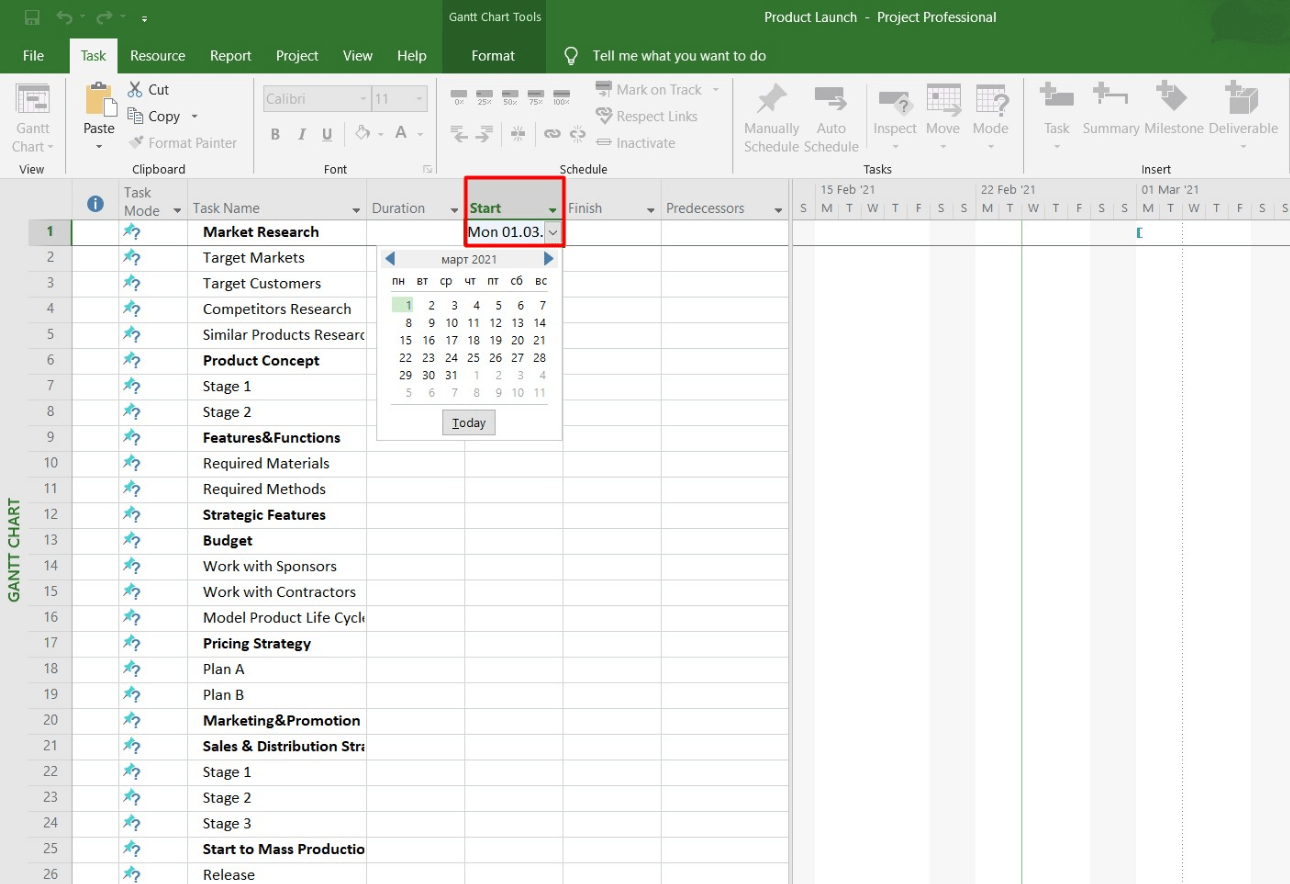
Project 2016 Professional for one Windows PC: Gantt charts, several timeline bars and Team Planner, with an optional link to Project Server. No subscription.
What you get with Project 2016 Professional
Project 2016 Professional (1PC) is the Professional edition of Microsoft’s 2016 desktop project planner, licensed for one PC running Windows 10 or Windows 11. It covers Gantt scheduling, timelines, resource planning and Team Planner, and it can connect to Project Server. We e-mail the key, the Microsoft download link and installation instructions once the payment is confirmed, usually within a few minutes, with a PDF invoice attached to the completed order. This is a one-time purchase, so there is nothing to renew.
What Project 2016 brought
- The Timeline view can hold several timeline bars, each with its own start and end dates, so phases or workstreams can be shown separately.
- Tell Me, the box above the ribbon, finds a command when you type what you want to do.
- With Project Server 2016 or 2019, a project manager can request a person’s time as a resource engagement, and a resource manager approves or rejects it.
- Office add-ins can read and write project data.
- Team Planner, which only the Professional edition includes, shows every resource’s assignments on one screen.
When Project 2016 is the right choice
Project 2016 suits offices that have standardized on the 2016 release. Files are not a reason to upgrade: Project 2010 through 2021 use one .mpp format, so plans travel in both directions. For a new PC, the later Project 2019 Professional and the current Project Professional 2024 are also in stock.
How to activate Project 2016 Professional
- Open setup.office.com in a browser and click Get Started.
- Log in to a Microsoft account (or register a new one).
- Enter the product key and select Next, then pick your language and confirm with Redeem. The Project 2016 setup file starts downloading on its own.
- Run the setup file and wait until the installer reports that it has finished.
- Start Project 2016. After a few seconds the Activation Wizard appears: choose the Internet option and click Next, which completes the activation.
Our Microsoft Project setup and activation walkthrough shows each of these screens.
System requirements
| Windows version | Windows 11, Windows 10 or Windows Server 2016 |
|---|---|
| Processor | 32- or 64-bit (x86/x64) with SSE2, 1 GHz or faster |
| Memory | 2 GB RAM |
| Disk space | 3 GB available |
| Display | 1024 × 768 |
| Graphics | DirectX 10 graphics card for hardware acceleration |
| Other | .NET 3.5; some Professional features need Project Server |
Questions about Project 2016 Professional
Will it install on a PC that already has Office 2016?
That depends on how Office was installed. Office 2016 exists in Click-to-Run and MSI form, and Microsoft doesn’t support two version 16.0 products with different installation technologies on one PC. In Word or Excel, open File → Account: if Update Options is shown, that copy is Click-to-Run. Office and Project also have to match: both 32-bit or both 64-bit.
Can Project 2016 open plans made in newer versions?
Yes. Project 2010, 2013, 2016, 2019 and 2021 share the same file format.
Is there help with the installation?
Yes. Our live chat and e-mail support are available 24/7 and help with installing and activating Project 2016.
Be the first to review “Project 2016 Professional (1PC)”
You must be logged in to post a review.
- Genuine Retail licenses. Every key is a genuine license that activates with Microsoft, or with ESET or Avast for antivirus. Unless the License line next to the price says OEM, it is a Retail license.
- Replacement if a key won't activate. Contact our support on live chat or by e-mail, day or night: we help you finish the activation or send a replacement key.
- Refund for unused keys. A key that has not been redeemed can be refunded within 7 calendar days of purchase, as set out in our Refund Policy.
- Invoice and instructions. Every order comes with a PDF invoice and instructions to download, install and activate the software.
You may also need

Reviews
There are no reviews yet.