
-
×
 Project 2019 Professional (1PC)
1 × €32,00
Project 2019 Professional (1PC)
1 × €32,00
VMware Workstation 17 Pro
€31,99
VMware Workstation 17 Pro is a high-performance virtualization software that lets you run multiple operating systems on a single Windows or Linux PC. Offered as a one-time purchase 1PC license, it delivers advanced features like 3D graphics acceleration, secure VMs, and full Windows 11 support – ideal for developers, IT pros, and power users seeking seamless virtualization.
Out of stock
🟢One-time payment 🟢 Instant Delivery to your Email
VMware Workstation 17 Pro
VMware Workstation 17 Pro is the latest version of VMware’s robust desktop virtualization software, enabling you to run multiple operating systems – Windows, Linux, and more – on a single physical computer. Ideal for developers, IT administrators, and advanced users, this 1PC License lets you isolate test environments, build cross-platform applications, or explore different OS setups without compromising your host machine. With enhanced graphics performance, improved security, and Windows 11 readiness, Workstation 17 Pro delivers a cutting-edge virtualization experience.
Key Features & Benefits
-
Multiple OS Environments on One PC
- Simultaneously run different operating systems (Windows, Linux, etc.) or multiple instances of the same OS, reducing hardware and setup costs.
-
Advanced 3D Graphics & GPU Support
- Leverage DirectX 11 and OpenGL 4.3 capabilities for resource-intensive tasks such as software rendering, game development, and 3D modeling.
-
Enhanced Security & Isolation
- Protect host integrity with Secure VMs, UEFI Secure Boot, and custom encryption options, ideal for testing software or analyzing malware safely.
-
Seamless Integration
- Copy and paste files, drag and drop, or share folders easily between host and guest. Network bridging, NAT, and custom virtual networks ensure flexible connectivity.
-
Snapshots & Clones
- Revert systems to previous states instantly using snapshot functionality, or replicate entire VMs with linked or full clones—saving time in test labs.
-
Compatibility with Latest OS
- Official Windows 11 support, updated Linux kernel compatibility, and expanded hardware support for cutting-edge CPU and GPU technologies.
What’s New in Workstation 17 Pro
- Windows 11 & Server 2022 Ready: Support for modern Windows operating systems as guests, including compliance with secure boot requirements.
- Improved Virtual TPM: Enhanced virtual Trusted Platform Module (TPM) for better encryption and OS security features.
- Expanded Hardware Compatibility: Updated CPU/RAM constraints, enabling more VMs to run simultaneously with improved performance.
- Seamless Linux Integration: Better support for new Linux distributions, kernel versions, and container-based workflows.
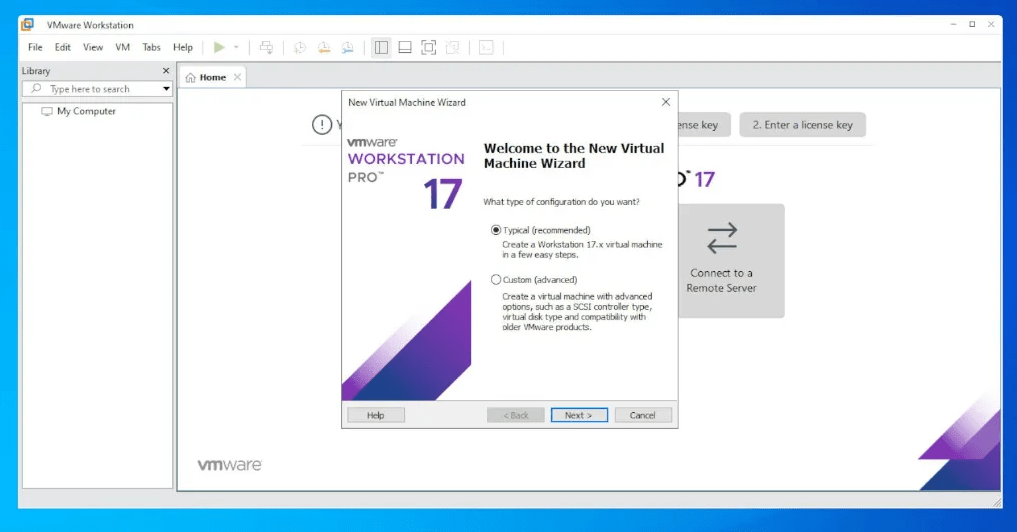
How to Install and Activate
Learn how to Install and Activate VMware Workstation 17 Pro with this Guide: https://officedigital.io/vmware-workstation-pro-installation-and-activation/
System Requirements
(Approximate guidelines; check official VMware docs for detailed specs.)
| Category | Requirement |
|---|---|
| Operating System | Windows 10 / 11 (64-bit), or Linux 64-bit distributions (Ubuntu, Fedora, etc.) |
| Processor | 1.3 GHz or faster core speed, 2+ cores recommended; Intel VT-x or AMD-V required |
| Memory (RAM) | 4 GB minimum (8–16 GB recommended for running multiple VMs) |
| Storage | 10+ GB free space per guest OS (SSD recommended for better performance) |
| Graphics | DirectX 11 / OpenGL 4.3 capable for advanced 3D acceleration |
| Other | Internet connection for software updates, VMware tools, and licensing activation |
Frequently Asked Questions (FAQ)
-
Q: Is VMware Workstation 17 Pro a subscription or a perpetual license?
A: This 1PC License is typically a perpetual license (one-time purchase). You may purchase future upgrades if VMware releases a major new version. -
Q: Which host operating systems are supported?
A: Workstation 17 Pro runs on Windows 10, Windows 11, and modern Linux distributions (e.g., Ubuntu, Fedora, CentOS). Always check VMware’s compatibility list for exact supported versions. -
Q: Can I virtualize macOS with Workstation 17 Pro?
A: Virtualizing macOS is officially supported only on Apple hardware (per Apple’s EULA). For typical PC hardware, it’s not supported or allowed by Apple’s license terms. -
Q: Do I need a powerful computer to run multiple VMs?
A: Yes. For multiple concurrent VMs or resource-intensive tasks, a multi-core CPU, ample RAM (16GB or more), and sufficient SSD storage are recommended. The exact requirements depend on your guest OS and application workloads. -
Q: Can I share VMs between hosts?
A: Yes, you can copy or move VM folders between machines running compatible versions of VMware Workstation or ESXi. Ensure the hardware and software versions align for a smooth transfer. -
Q: How do I receive updates and support?
A: VMware provides patch updates, minor releases, and optional paid support plans. Check vmware.com or the integrated update feature for the latest patches.
Be the first to review “VMware Workstation 17 Pro”
You must be logged in to post a review.
✅ We provide an official invoice for every order, ensuring that your license is genuine.
✅ All the licenses we provide are original and can be used with your account on the official website to access the software.
✅ Every license includes detailed instructions on how to download, install, and activate the software
✅ For any issue, please connect with us via live chat. Our support team will promptly assist you in resolving the problem or provide a replacement if necessary.
✅ All the licenses we provide are original and can be used with your account on the official website to access the software.
✅ Every license includes detailed instructions on how to download, install, and activate the software
✅ For any issue, please connect with us via live chat. Our support team will promptly assist you in resolving the problem or provide a replacement if necessary.
Related products
Out of stock
-83%
Development
Original price was: €289,00.€49,99Current price is: €49,99.
-26%
Full Catalog
Original price was: €120,00.€89,00Current price is: €89,00.
Reviews
There are no reviews yet.